Types of Email Attachments: File Formats, Size Limits, and Deliverability
Key Takeaways
- Check the file type, file size, and number of attachments before you send.
- Avoid risky executable, archive, and HTML attachment types when a safer option will do.
- Keep attachments lightweight, and use a protected sharing link when a file is large or sensitive.
- Test the real message with its attachment or link before a campaign goes live.
When it comes to getting your emails delivered to the inbox – and not spam – your content and setup matter. But there’s one often-overlooked factor that can seriously impact deliverability: attachments.
Whether you’re sending a whitepaper, a PDF invoice, or a proposal, understanding the types of email attachments you send can make the difference between inbox or junk folder.
🧠 Why Attachments Trigger Spam Filters
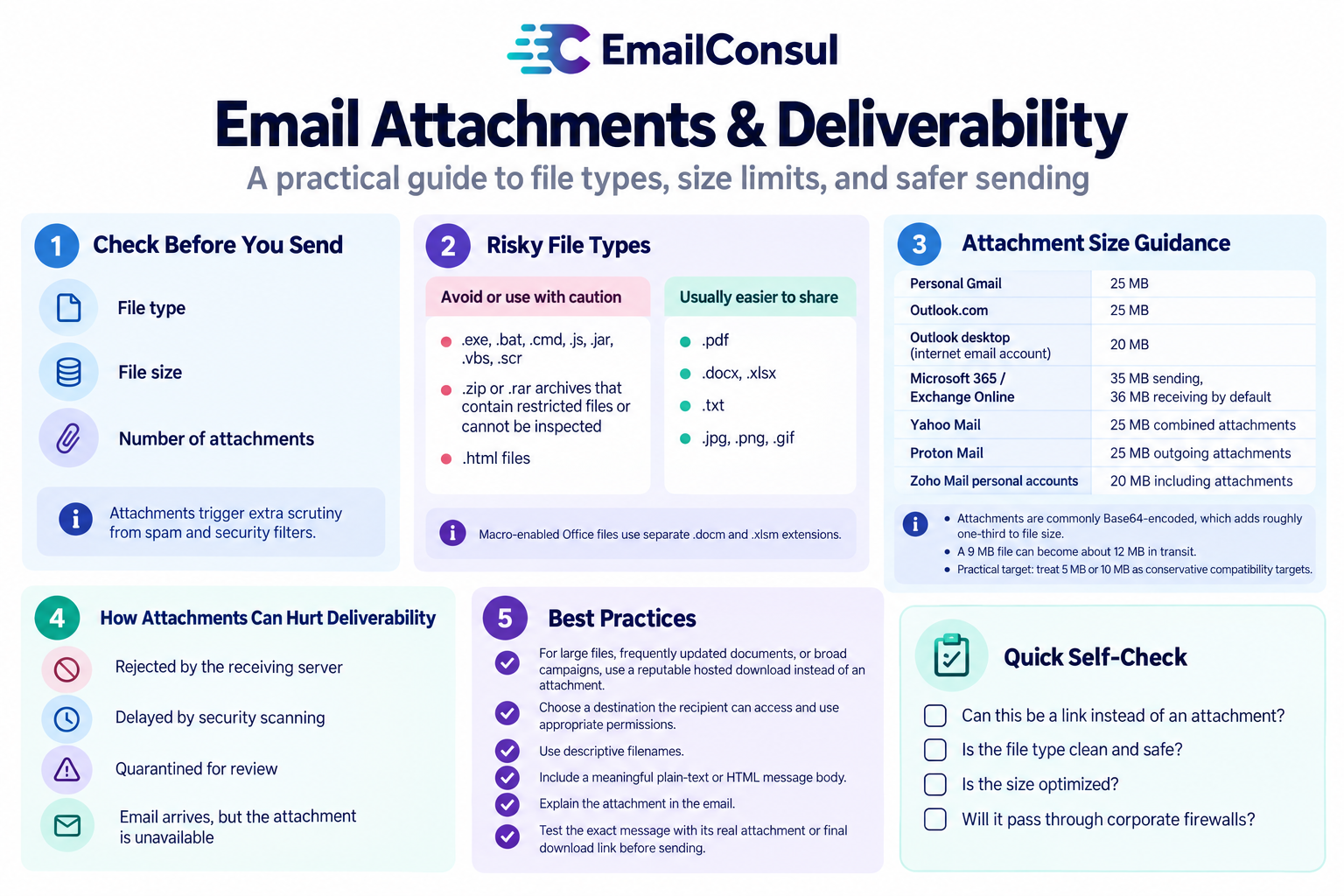
Spam filters treat attachments with extra caution – and for good reason. Malicious actors frequently use attachments to spread viruses, phishing attempts, or malware. This is why filters have strict rules around it, specifically:
✓ File type
✓ File size
✓ Number of attachments
If your attachment raises red flags, even a technically perfect email can be flagged as suspicious.
Recipient organizations can also apply their own attachment-type rules. Microsoft documents how these controls work in Outlook on the web.
🚫 Risky File Types to Avoid
File extensions help recipients and security systems understand what a file is expected to do. Executable files, scripts, and some archives deserve extra scrutiny.
Some file types are commonly restricted:
🚩 .exe, .bat, .cmd, .js, .jar, .vbs, .scr
🚩 .zip or .rar archives that contain restricted files or cannot be inspected
🚩 .html files (can contain scripts or phishing forms)
Even when they are legitimate, recipient policies can reject, quarantine, or block access to emails with these files.
✅ Common formats that are usually easier to share include:
🟢 .pdf
🟢 .docx, .xlsx (macro-enabled Office files use separate .docm and .xlsm extensions)
🟢 .txt
🟢 .jpg, .png, .gif (standard image formats)
For Office files with macros, use a documented, expected workflow. Microsoft explains why macros from internet files are blocked by default.
Password-protected archives can also create inspection problems. Gmail documents restrictions for blocked files and password-protected archives.
📏 Attachment Size Limits: What’s Too Big?
Attachment limits can apply to the entire message, the attachment itself, a desktop email client, or a recipient organization. Check the limit that applies to the actual sending route, then leave room for encoding and the message body.
| Provider or product | Documented limit | What readers should know |
|---|---|---|
| Personal Gmail | 25 MB of attachments | Larger files are offered as Google Drive links in Gmail's sending flow. |
| Outlook.com | 25 MB per email | The limit includes message content and inserted or attached files. |
| Outlook desktop with an internet email account | 20 MB | The desktop client can impose a lower limit than the mailbox provider. |
| Microsoft 365 / Exchange Online | 35 MB sending, 36 MB receiving by default | Administrators can configure organization limits, subject to client constraints. |
| Yahoo Mail | 25 MB combined attachments | A file near the limit may not fit once message overhead is included. |
| Proton Mail | 25 MB outgoing attachments | Incoming limits differ, and encoding adds size. |
| Zoho Mail personal accounts | 20 MB including attachments | Organization limits can vary by plan and administrator settings. |
| Corporate mail servers | Varies by organization | Recipient security policies can impose lower limits than public provider defaults. |
Attachments are commonly Base64-encoded for email, which adds roughly one-third to the file's size before message headers and body content are counted. A 9 MB file can therefore become about 12 MB in transit. RFC 2045 explains this encoding overhead.
👉 Practical target: Treat 5 MB or 10 MB as conservative compatibility targets, not universal spam-filter thresholds.
🧩 How Attachments Affect Email Deliverability
Unsupported or oversized attachments can lead to different outcomes:
🚫 It can be rejected by the receiving server
⏳ Security scanning can delay delivery
🔒 A recipient organization can quarantine the message for review
📎 The email can arrive while the attachment remains unavailable in the recipient's client
Check the delivery response and the recipient's policy before treating every attachment problem as an inbox-placement failure. Microsoft Safe Attachments documents how security scanning can delay or quarantine a message.
Need to Test a File Before You Send?
Send the exact campaign, including its attachment or download link, to EmailConsul seed inboxes before it reaches your audience. Review inbox, promotions, spam, junk, quarantine, and not-received placement across providers.
💡 Best Practices for Sharing Files and Sending Attachments
If you need to include an attachment, follow these guidelines:
✅ For large files, frequently updated documents, or broad campaigns, a reputable hosted download can be more practical than an attachment.
✅ Choose a destination your recipient can access, use appropriate permissions for the document's sensitivity, and make the file name and destination match the promise in the email.
📎 Include the link with a clear call to action, such as:
“Download the report here” or “View the full proposal online”
🔐 Bonus: A hosted link does not bypass security checks. Mailbox and security tools can inspect links and downloaded files, so test the final tracked link and its permissions.
✅ Use descriptive filenames (avoid generic or suspicious names)
✅ Include a meaningful plain-text or HTML message body, rather than sending only a file
✅ Include a sentence explaining the attachment:
“Attached is our Q2 proposal in PDF format for your review.”
P.S. Attachments increase the size of your email traffic and can slow sending when your MTA is under heavy load.
A hosted file also carries the trust signals of its destination. See how link-domain reputation can affect the broader picture.
Test the Real Message Before You Send
Before a campaign goes out, test the exact email with its real attachment or final download link. Check delivery, inbox placement, attachment access, and file permissions. If an attachment is the suspected problem, compare otherwise similar test messages with and without it. Seed results are useful diagnostics, but they cannot reproduce every recipient's history or corporate policy. For more context, read why open rates do not prove inbox placement.
Want to Check How Attachments Affect Inbox Placement?
Send the real campaign to EmailConsul seed inboxes and review inbox, promotions, junk, quarantine, spam, and not-received results before it reaches your recipients.
📬 Final Thoughts on Attachments
Attachments aren’t bad by default, but they are high risk for deliverability if not used correctly.
Ask yourself:
📍 Can this be a link instead of an attachment?
📍 Is the file type clean and safe?
📍 Is the size optimized?
📍 Will it pass through corporate firewalls?
When in doubt, lean toward links, clean formatting, and lightweight delivery. Your deliverability and your audience will thank you.