SPF Authentication
Checks whether the SPF record is valid and whether the sending source is authorized for the domain. Learn more about DNS records for email authentication.
Check where your email campaign lands before sending to real customers.
EmailConsul's free inbox placement test shows provider-level results across Gmail, Yahoo, Outlook, Microsoft, and other mailbox providers, including Inbox, Spam folder, Promotions, or Not Received.
The audit report also works as an email deliverability test for SPF, DKIM, DMARC, blocklists, sender reputation, headers, and content signals.
Follow the steps below to get started with your free deliverability audit:
Copy emails (or download ) with a listof seed email addresses
Import your contacts in your email marketing tool.
(Please note this seed list can only be used once)
Send an email to this list as you normally would.
Once the emailing has finished, click on the 'View my results'
Watch how to run a free inbox placement test and check where your emails land.






Use this example to connect the results of your inbox placement test with the next thing to investigate. Start with placement, open an affected provider, then follow the evidence into the supporting checks.
Demo report: All results, identities, and warnings below are mock data for guidance. Your report reflects your own test; seed placement does not guarantee the same result across your subscriber list.
The overall inbox percentage, spam percentage, and unreceived percentage show where the email landed. Use them to decide where to look next: spam placement and missing messages call for different investigations.

Here, the completed test still contains eight spam results and one unreceived message. Progress 100% means collection has finished; it does not mean the campaign is ready to send. Open the provider comparison to see where those problems are concentrated.
For more context, read why open rates do not prove inbox placement.
Review provider-level results across Gmail, Outlook/Hotmail, Yahoo, iCloud, Laposte, and GMX and others. This helps you see whether the issue affects many providers or only specific inboxes.

All five Gmail messages reached the inbox, while Hotmail, GMX, and Laposte each have two spam results. The overall result hides that difference. Start with providers important to your audience, then look for patterns shared across the affected groups. A problem concentrated at one provider calls for a closer look at that group's rows; a widespread problem calls for a search for shared sending or authentication issues.
The Microsoft consumer-mail group is labeled Hotmail in this report. Small seed groups are useful leads; confirm a repeated pattern before treating it as a provider-wide conclusion.
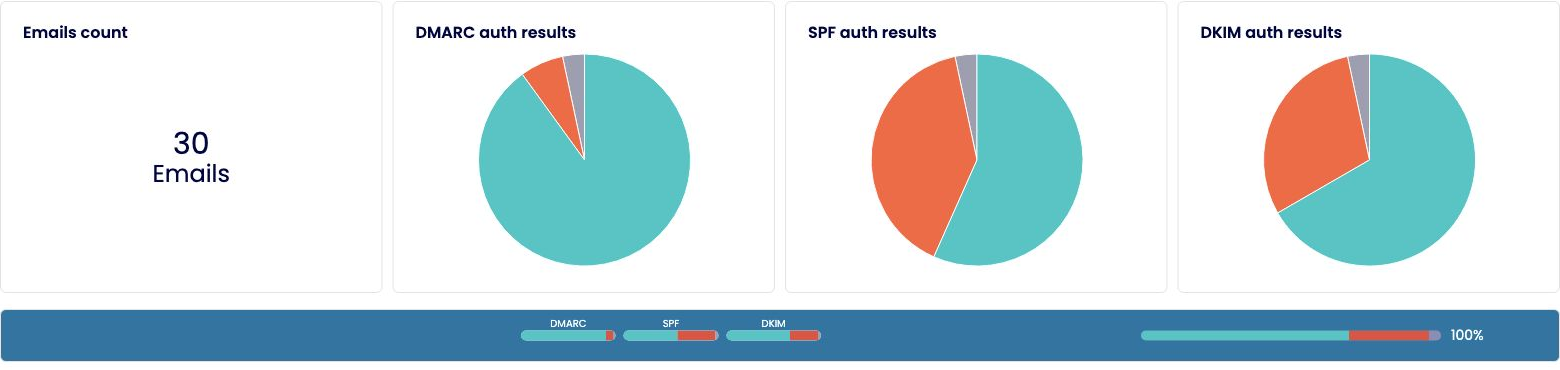
The authentication charts help you spot whether SPF, DKIM, or DMARC failures deserve attention. Follow a failure into the provider and seed rows before changing configuration. The individual result tells you which sending IP and message to investigate; the summary alone cannot explain a spam placement. Unknown means authentication evidence is unavailable, as the missing Yahoo message below illustrates.
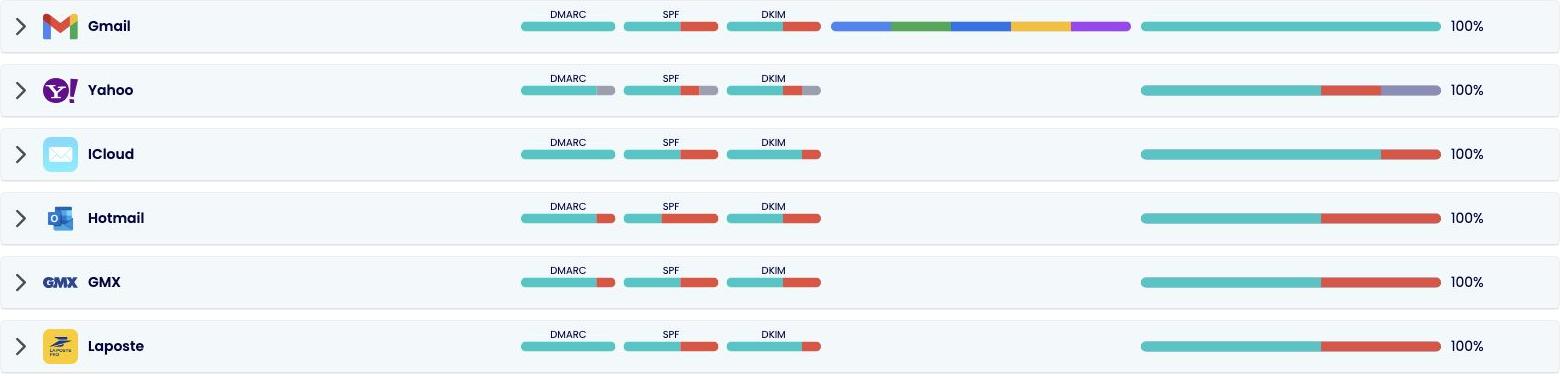
Click the arrow beside an affected provider to open its seed table. The authentication bars give you a lead; the placement bar shows what happened to the message. Hover over a bar in the live report for its details. If authentication passes while placement is poor, continue beyond authentication, as the GMX example below demonstrates.
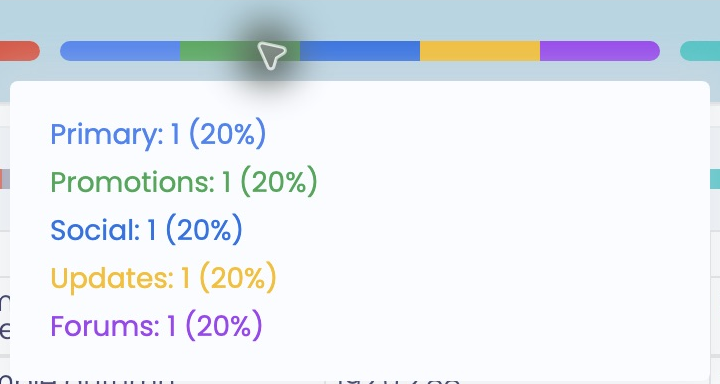
Each of Gmail's five messages reached the inbox in a different category. Promotions is an inbox category, alongside Primary, Social, Updates, and Forums. The expanded seed table now shows the category in the Status column, for example Inbox / Promotions.
For a promotional campaign, Promotions can be an appropriate destination. Investigate spam placement separately; changing copy to pursue Primary is a different test.
Open each provider group to review individual seed email results, including email address, sent time, received time, sender, subject line, and sending IP. Use those details to trace the affected message in your sending platform and connect it to the checks below.

Choose a row that represents the problem. Confirm its From address and subject belong to the campaign you tested, then note the provider, seed address, time, sending IP, status, and failed authentication checks. These details give your sending provider or domain administrator a specific message to investigate.

GMX seed-024 reached Spam despite passing DMARC, SPF, and DKIM. Seed-025 also reached Spam, but failed all three. These results lead to different next steps:
For seed-025: investigate the failed authentication methods (DMARC, SPF, DKIM) with the sending provider or domain administrator.
For seed-024: look beyond authentication at sending history, reputation, recent volume changes, and the campaign itself. The authentication passes (DMARC, SPF, DKIM) do not explain why the provider chose spam.
The first two Gmail rows show that SPF and DKIM can also disagree while DMARC passes. For a real message, DMARC needs at least one passing method (passing SPF or passing DKIM) aligned with the visible From domain; both methods do not have to pass.
After a change, send through the same route and compare the affected provider's placement again. A greener supporting check is useful, but the placement result tells you whether the original symptom changed.

Yahoo seed-010 is marked Not received and has no received-message details. Check that this exact address was included, then find its send events, deferrals, bounces, or rejection response in your platform. Not received does not establish that the provider rejected the message. If the report still shows Waiting, let collection finish before treating it as a final result.
The blank message fields and authentication dashes indicate unavailable received-message evidence, rather than failed authentication checks.

IP Reputation Monitoring gives you a concrete finding to investigate with your sending provider. The example lists 192.0.2.88 and 198.51.100.76 against Spamhaus - Zen and Abusix. Match those addresses with the IP column in affected seed rows: do problems recur on the same sending IP?
Give your provider the IP, list name, and affected results. Ask it to verify the current listing and follow the list operator’s resolution process. A listing is a lead, not a confirmed explanation for every spam result; an omitted IP is not proof of a clean reputation everywhere.
Related tool: IP Blacklist Checker.

Domain Reputation & Authentication Monitoring shows an Abusix listing for the sample sending domain, mailer.example. This is a finding about the domain, separate from the sending IP listings above. Its five A-record addresses do not establish which servers actually sent the email; use the seed table above for that connection.
If your domain appears on a blocklist, ask its administrator to verify the listing and investigate the reason before requesting removal. Use the finding alongside placement results: these DNS and blocklist checks do not expose Gmail’s or Microsoft’s private reputation assessment.
Related tool: Domain Blacklist Checker.
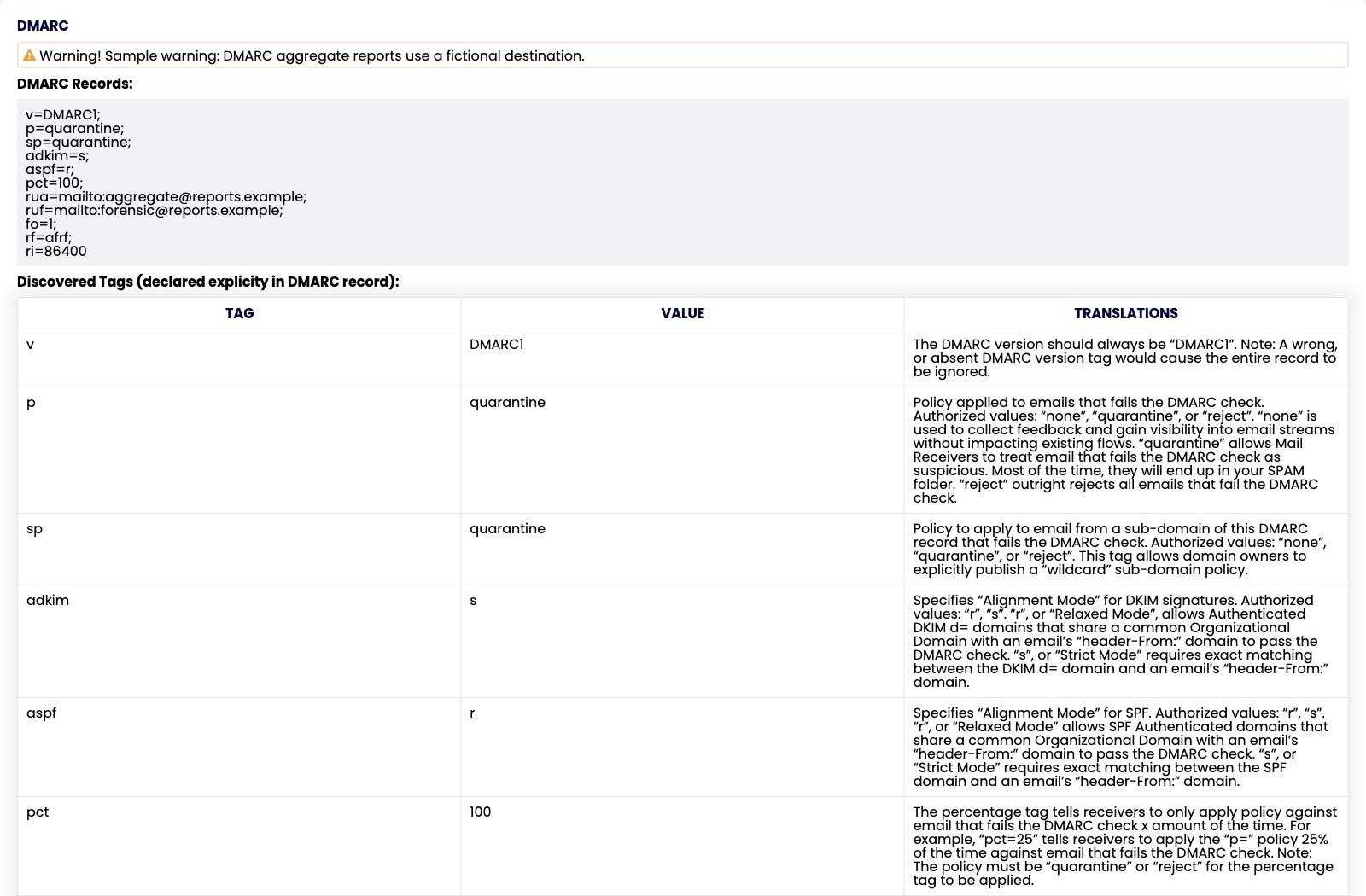
The example DMARC record requests quarantine for messages that fail DMARC, including subdomain mail. Check that policy against your failed seed results: legitimate mail that fails authentication needs investigation before you strengthen enforcement (move p tag from none to quarantine to reject).
The alignment settings matter here: DKIM requires an exact domain match, while SPF permits alignment within the same organizational domain. DMARC needs at least one passing, aligned method (SPF or DKIM). A generic SPF or DKIM pass alone does not establish alignment.
Ask your domain administrator to check the failed message’s authenticated domains against its visible From domain. Also review unfamiliar reporting destinations; the sample’s warning flags a fictional one. A published policy is not proof that a message passed, and receivers decide final placement.
Related tool: DMARC Checker.
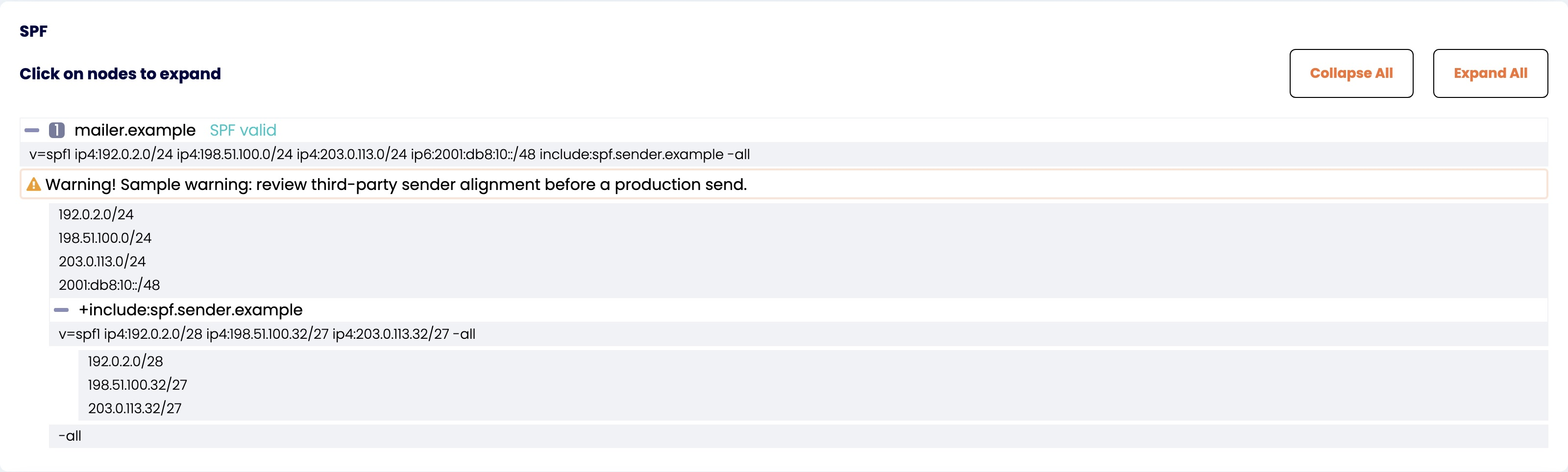
The SPF record is marked valid, yet the seed table above includes SPF failures. Those results answer different questions: the published record can be readable while failing to authorize the server used for a particular message.
Select Expand all to follow the included sender record. If a legitimate message fails, ask your sending provider to compare its actual sending IP with the authorized sources. Confirm which envelope-sender domain was checked, often visible in Return-Path, because it can differ from the visible From address. For SPF to satisfy DMARC, those domains must align. This is the issue to investigate behind the example’s alignment warning.
Related tool: SPF Checker.
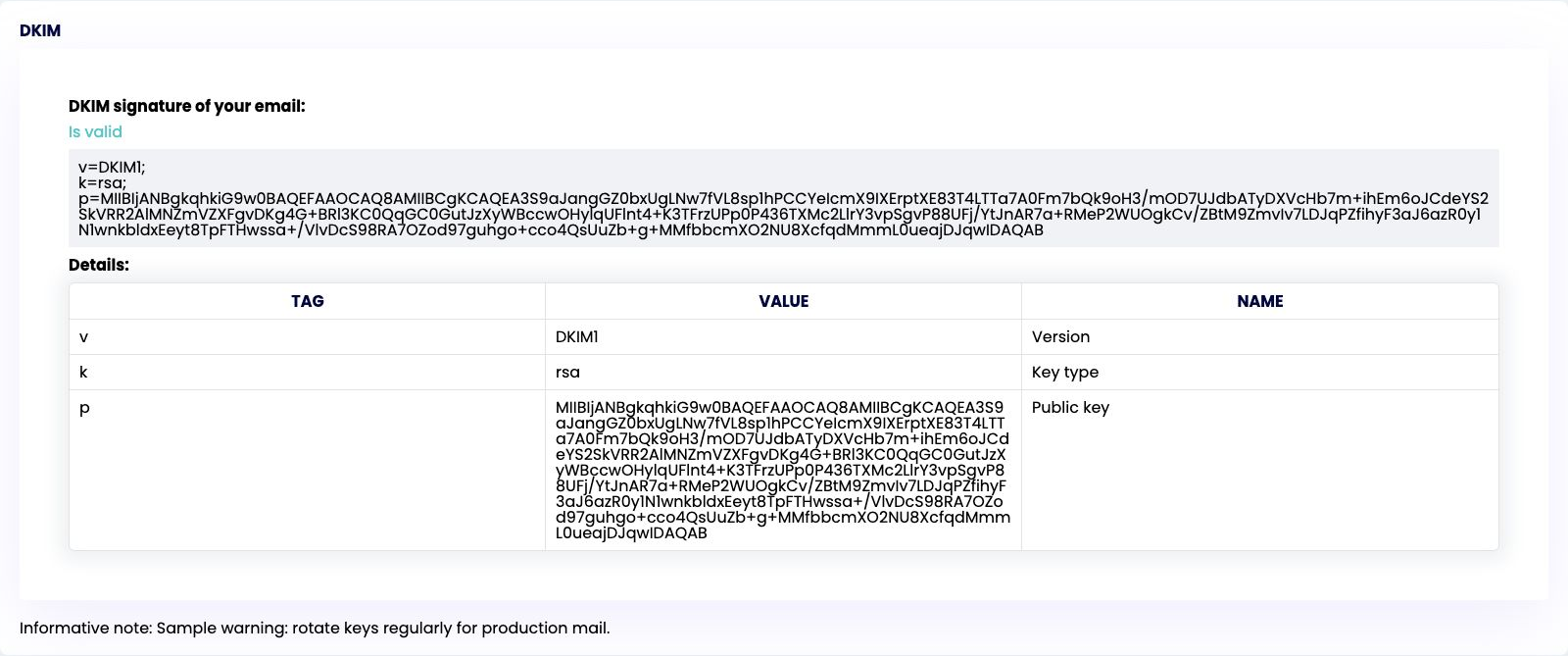
The DKIM record is marked Valid, but some seed messages fail DKIM. Publishing a usable public key does not show that every sending route signs messages correctly or that each signature survives delivery.
Send your email provider an affected seed address, sending time, and failed result. Ask it to check the actual message’s signing domain and selector against the published key and investigate verification failure. If DKIM passes but DMARC fails, investigate alignment with the visible From domain. The sample’s key-rotation notice is maintenance guidance, not a diagnosis of its failed messages.
Related tool: DKIM Checker.
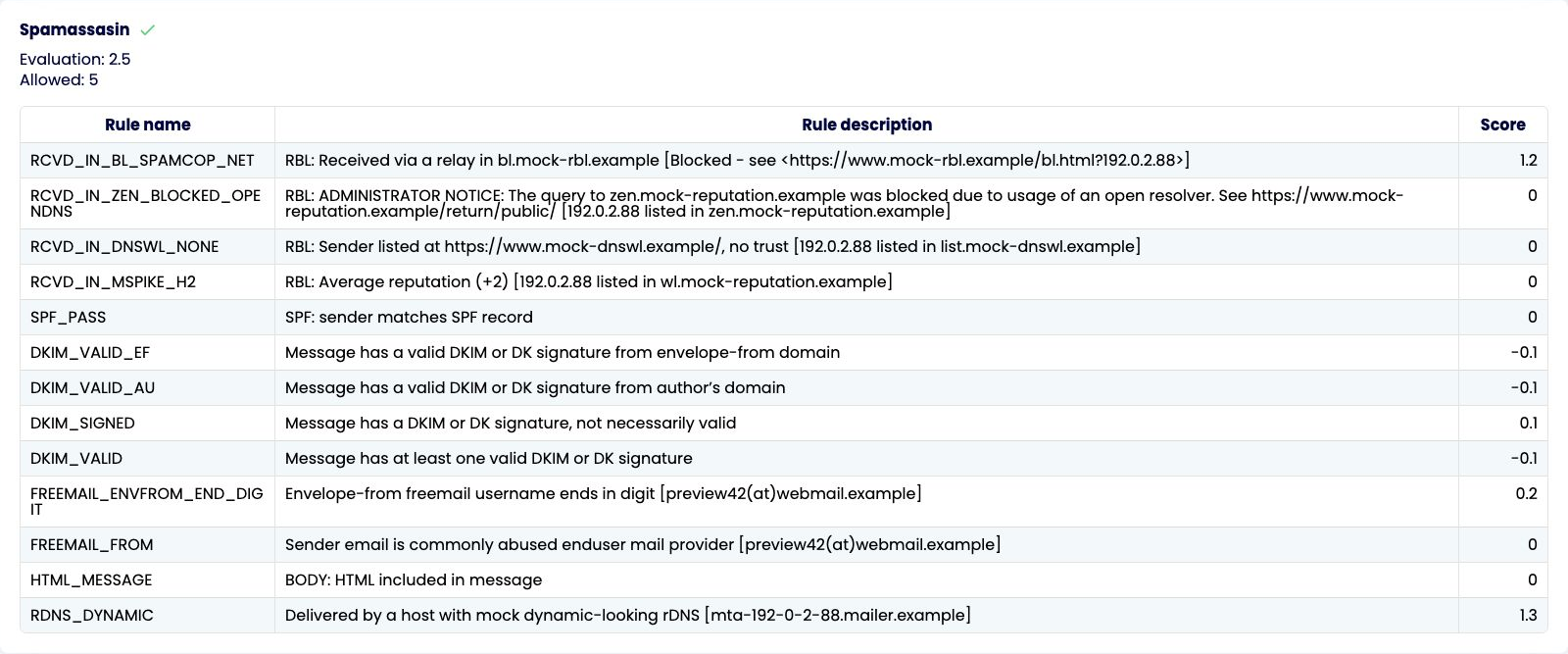
SpamAssassin checks email content, headers, formatting, and message-level signals that may contribute to spam filtering. Here, the SpamAssassin score of 2.5 is below the displayed threshold of 5, but the report still records eight spam placements. A green result from this filter does not settle how mailbox providers treat the message.
Start with the largest positive rules. RDNS_DYNAMIC and RCVD_IN_BL_SPAMCOP_NET point to sending infrastructure and reputation; share those findings with your sending provider. Prioritize these infrastructure findings before testing content changes.
Read each description before acting: DKIM_SIGNED only confirms a signature exists, HTML_MESSAGE does not make HTML an error, and a blocked-query notice means a lookup problem rather than a confirmed listing. For relevant content findings, review spam trigger words and content signals. Fix a finding supported by the evidence, then rerun the test through the same sending route.
Use Save to pdf to keep the findings and share the relevant rows with the team investigating them.

Use the report to spot visible problems before sending to your real audience, such as spam placement, missing messages, provider-specific filtering, suspicious content signals, or reputation-related issues.
If reputation is part of the issue, compare domain reputation and IP reputation.
The audit report gives you a practical email deliverability test by checking the main authentication, reputation, and content signals that affect whether a message reaches the inbox, lands in spam, or remains unreceived.
SPF Authentication
Checks whether the SPF record is valid and whether the sending source is authorized for the domain. Learn more about DNS records for email authentication.
DKIM Signature
Checks whether the email has a valid DKIM signature and shows DKIM record details such as version, key type, and public key.
DMARC Policy
Checks the DMARC record, including policy tags such as p, sp, and rua, so you can understand how failed authentication should be handled.
Domain Reputation
Checks domain-level signals, including A records, authentication monitoring, and domain blacklist results. Compare domain reputation and IP reputation.
IP Reputation
Checks sending IP addresses, reverse DNS records, and IP blacklist results that may affect mailbox provider filtering.
SpamAssassin Content Analysis
Checks the message content, headers, formatting, and other message-level signals that may increase spam filtering risk. Review spam trigger words and content signals.
Do not wait until open rates drop or customers report missing emails. Test your message before newsletters, product launches, cold outreach, seasonal promotions, or transactional updates. EmailConsul helps you check inbox placement, spam folder placement, provider-level results, authentication, blocklists, sender reputation, headers, links, and content signals before the email campaigns reach your real audience.
Email delivery usually means the receiving server accepted the message. Inbox placement shows where the message actually landed after filtering. A delivered email can still land in spam.
Run a test before major email campaigns, after changing your ESP, domain, IP address, DNS records, template, links, subject line, or sending volume. Learn more about how seedlisting tests work.
Mailbox providers use different reputation signals, engagement data, spam filters, and algorithms. One provider may place the email in the inbox while another sends it to spam.
Review sender reputation, SPF, DKIM, DMARC, blocklists, content, links, headers, tracking domains, bounce rate, complaints, and engagement metrics.
No. An SMTP test can confirm whether a server accepts a message. A deliverability test goes further by showing whether the email lands in the inbox, spam folder, promotions tab, or fails to arrive. SMTP errors and delivery feedback are explained in our guide to SMTP errors and delivery feedback.
SPF, DKIM, and DMARC are the main records. Misconfigured DNS, failed alignment, or missing authentication can reduce trust with mailbox providers.
Yes. Subject lines, spam trigger words, links, images, headers, tracking domains, formatting, and spam score can all influence filtering decisions.
With over 17 years of experience in email deliverability, EmailConsul helps senders monitor inbox placement, sender reputation, authentication, domain health, IP reputation, and email campaign performance. Use the free email delivery test to find deliverability issues faster, then continue monitoring the signals that affect long-term inbox visibility.
Get Started