Detect Spoofing and Unauthorized Senders
Use recurring DMARC monitoring to identify sources that send email on behalf of your domain without proper authorization or alignment.
Upload a DMARC aggregate XML file and turn raw reporting data into a readable summary. See sending sources, message volume, SPF and DKIM results, DMARC alignment, receiver details, and policy disposition without reading XML manually.
No setup required. Use this free dmarc report xml analyzer for one report, then use DMARC Monitoring when you need ongoing reports, dashboards, alerts, and history.






DMARC aggregate reports are useful, but the raw XML format is difficult to review by hand. This free analyzer parses the XML file and organizes the report into readable information so you can understand which sources are sending on behalf of your domain and whether they pass authentication.

See the source IPs, sending domains, receiver, and message counts found in the report. This helps you identify legitimate services, old platforms, unexpected vendors, or unauthorized sources.

Review SPF and DKIM authentication results together with DMARC alignment. A message can pass SPF or DKIM but still fail DMARC if the authenticated domain does not align with the visible From domain.

Understand whether messages were accepted, quarantined, rejected, or reported with another disposition. Use this data to decide whether your DMARC policy is ready to move beyond monitoring mode.
Check report metadata, receiver organization, reporting period, and RUA data. This is especially useful when you receive reports from Google, Gmail, Yahoo, Microsoft, and other mailbox providers.
The analyzer reads the XML structure, extracts report metadata, policy data, and record-level results, then presents the information in a readable format. Instead of searching through XML tags manually, you can review the important details faster: source, count, SPF result, DKIM result, alignment, and disposition.
Use the tool when you receive a single DMARC aggregate report and want a quick view of what happened. It is useful for troubleshooting a specific file, checking a new DMARC setup, or confirming whether a sender is properly authenticated.
The parser is built for fast validation and feedback from a single report, so you can review XML files without turning a quick check into a manual XML reading task.
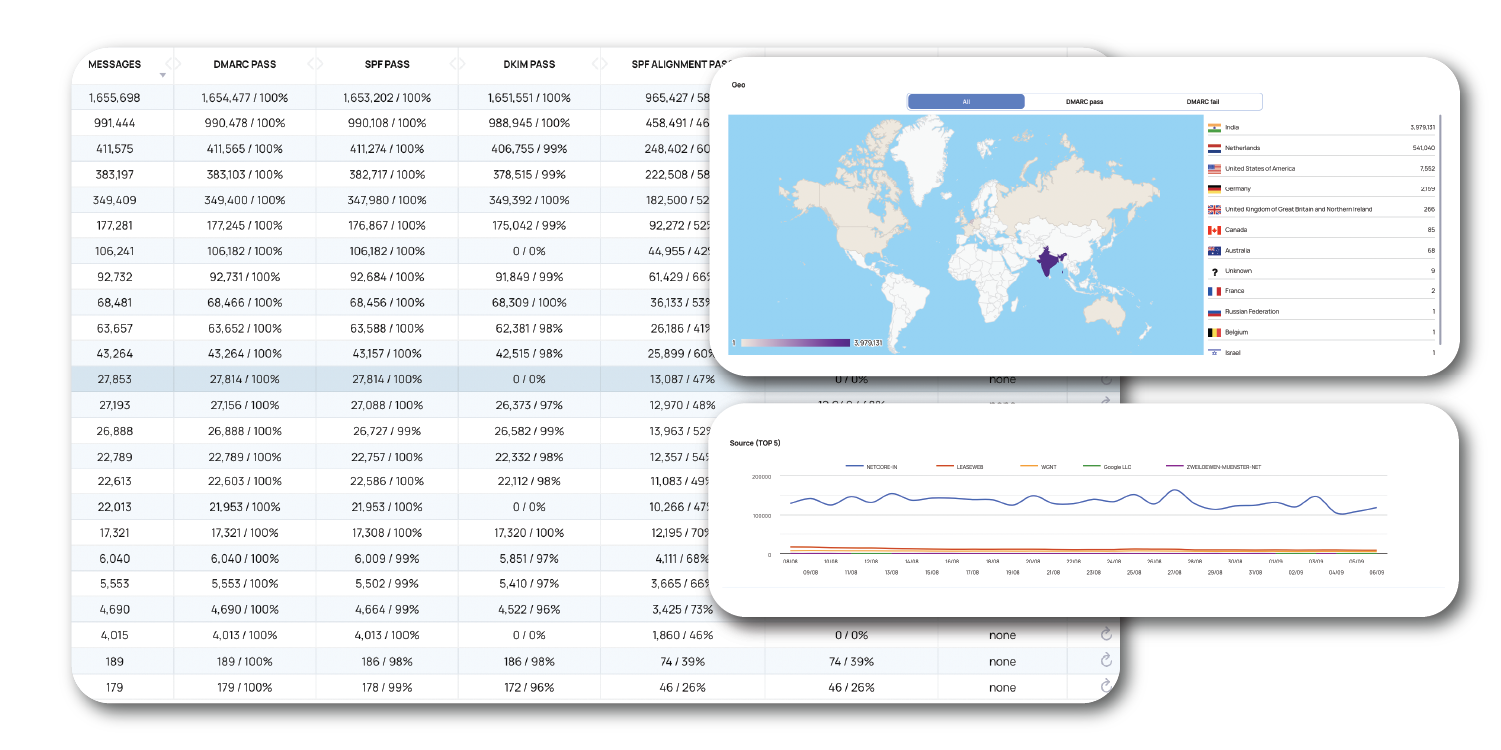
A free report analyzer is useful for checking one XML file. But if your domain sends regular email, manual uploads are not enough. EmailConsul DMARC Monitoring automatically collects and analyzes reports, tracks trends, shows dashboards, and alerts you when authentication failures, spoofing attempts, phishing risks, or new sending sources appear.
Use recurring DMARC monitoring to identify sources that send email on behalf of your domain without proper authorization or alignment.
Monitor DMARC compliance across multiple domains and subdomains, instead of checking each XML file separately.
Move from one-time XML parsing to ongoing visibility with dashboards, alerting, and historical reporting.
Automatically collect, analyze, and monitor DMARC aggregate reports over time.
Validate your DMARC DNS record before analyzing incoming reports.
Learn how aggregate reports turn email authentication data into deliverability insights.
Understand SPF, DKIM, alignment, policy, and reporting problems.
Learn how report insights can expose DNS, SPF, DKIM, and alignment issues.
One XML file can show what happened once. Continuous DMARC monitoring shows what is changing across your domains, senders, receivers, and authentication results over time. EmailConsul helps you detect spoofing, fix SPF and DKIM alignment issues, review aggregate reports, and protect your domain reputation before small problems become deliverability or security risks.
A DMARC report XML analyzer reads a DMARC aggregate report file and turns the raw XML into a readable summary. It helps you review sending sources, message volume, SPF results, DKIM results, DMARC alignment, receiver information, and policy disposition without manually reading XML tags.
A DMARC report analyzer reviews XML reports that mailbox providers send after email is processed. A DMARC record checker validates the DNS TXT record published at _dmarc.yourdomain.com. Use the record checker to verify configuration, and use the report analyzer to understand real authentication results from received reports.
A DMARC aggregate report usually includes report metadata, receiver information, date range, source IPs, message counts, SPF and DKIM results, DMARC alignment, policy settings, and the action applied by the receiver.
DMARC reports are machine-readable XML files. They contain useful data, but the structure is not comfortable for daily review. An analyzer parses the XML and presents the most important records in a cleaner format.
It can help you identify suspicious or unauthorized sending sources in the report. If an unknown IP or service sends mail using your domain and fails SPF, DKIM, or alignment, that may indicate spoofing, phishing, misconfiguration, or an unapproved sender.
DMARC requires authentication and domain alignment. A message may pass SPF or DKIM technically, but still fail DMARC if the authenticated domain does not align with the visible From domain.
RUA is the reporting address where aggregate DMARC reports are sent. It is usually added to the DMARC record as a rua=mailto: tag. The reports sent there help you monitor authentication results across receivers.
One report is useful for troubleshooting, but it is only a snapshot. For serious sending domains, ongoing DMARC monitoring is better because it shows trends, new senders, repeated failures, and changes across Gmail, Yahoo, Microsoft, and other receivers.
Move to DMARC Monitoring when you receive reports regularly, manage multiple domains, need alerts, want history, or need to track unauthorized sources and authentication failures over time.
Yes, indirectly. DMARC analysis helps you find authentication failures, misaligned senders, unauthorized sources, and policy problems. Fixing those issues can improve trust with mailbox providers and support stronger domain reputation.