Sender Visibility
Identify approved services, legacy platforms, unknown senders, and provider-level traffic patterns before they create larger security threats or deliverability issues.
EmailConsul helps you monitor DMARC aggregate reports, validate SPF and DKIM alignment, identify legitimate and unauthorized senders, and detect phishing or spoofing attempts before they damage your domain reputation. Use one dashboard to review authentication results, provider-level data, alerts, and policy status across every sending domain.
Need to inspect a single XML file first? Try the Free DMARC Report XML Analyzer.






Publishing a DMARC record is only the first step. Mailbox providers continue sending aggregate reports that show which IP addresses, services, and domains send email on your behalf. Without ongoing monitoring, you may miss SPF failures, DKIM alignment issues, unauthorized senders, or configuration changes that affect email security and deliverability.
EmailConsul turns raw DMARC report data into clear dashboards, alerts, and summaries so your team can understand what is happening, fix authentication issues, and move safely from p=none toward stronger enforcement such as
quarantineor
reject.
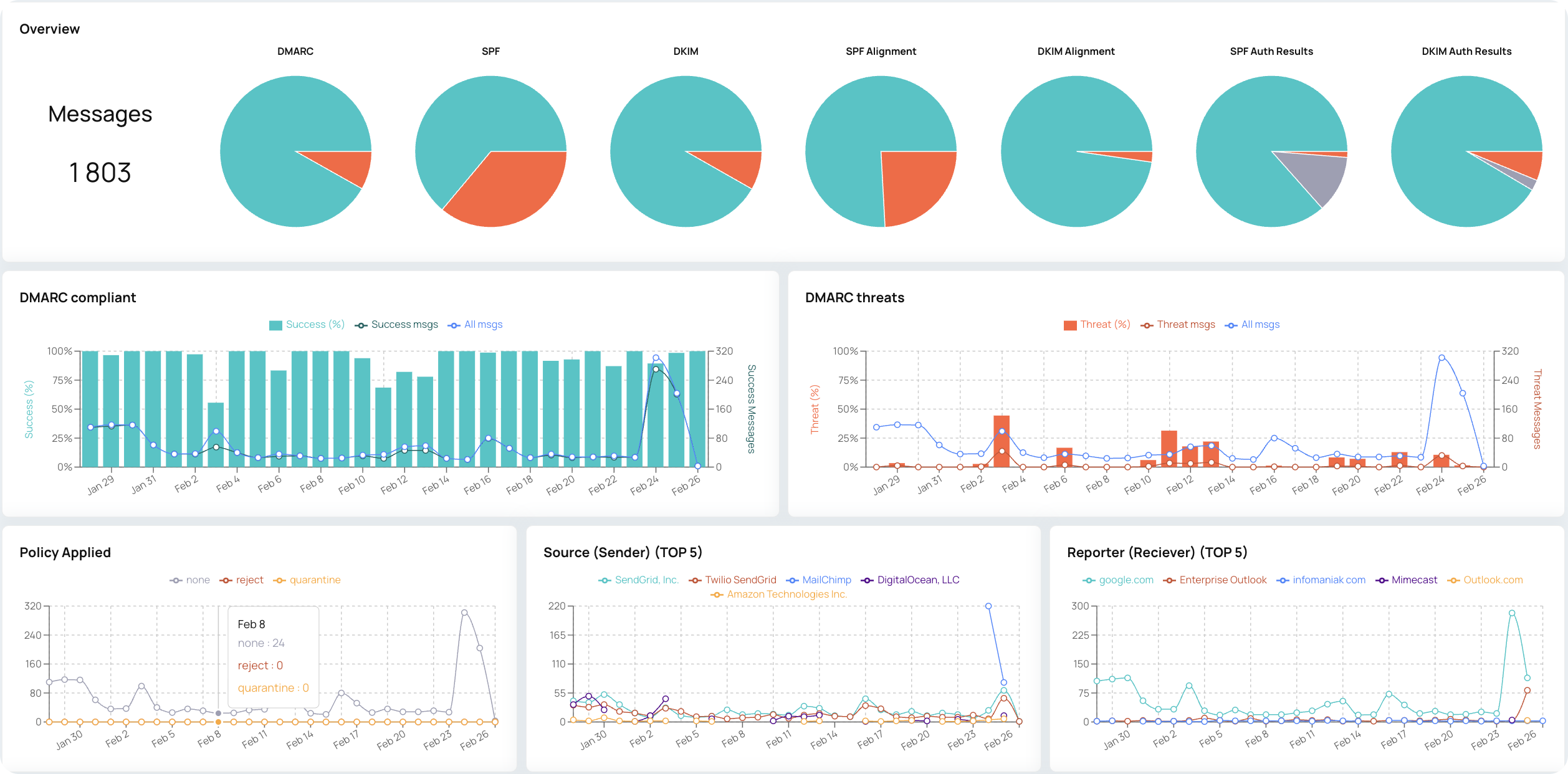
EmailConsul analyzes DMARC aggregate reports and authentication data across your sending ecosystem. Instead of reading XML files manually, you can review sender sources, SPF and DKIM results, policy decisions, alignment, failed checks, and suspicious activity in one place.
See whether SPF and DKIM pass, fail, or align with the visible From domain. Alignment details help you validate legitimate email services and find authentication gaps before they become delivery or security problems.
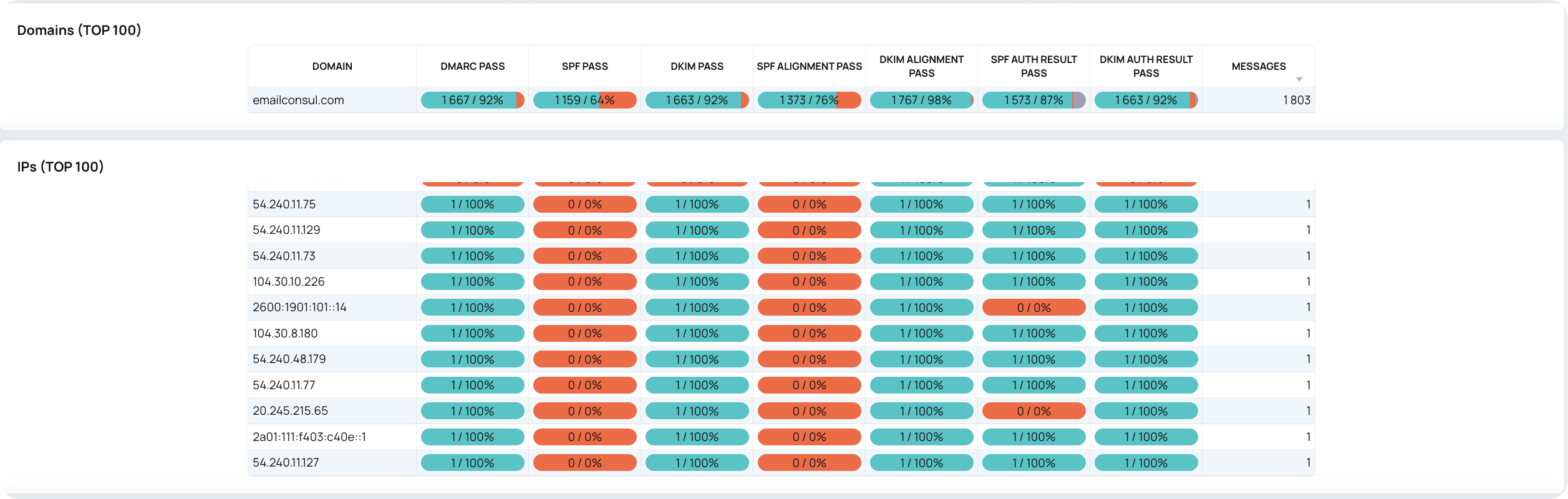
Identify which domains, subdomains, IP addresses, and sending services are using your brand. This helps you separate approved senders from unknown or suspicious sources and investigate reputation issues when authentication results look unusual.
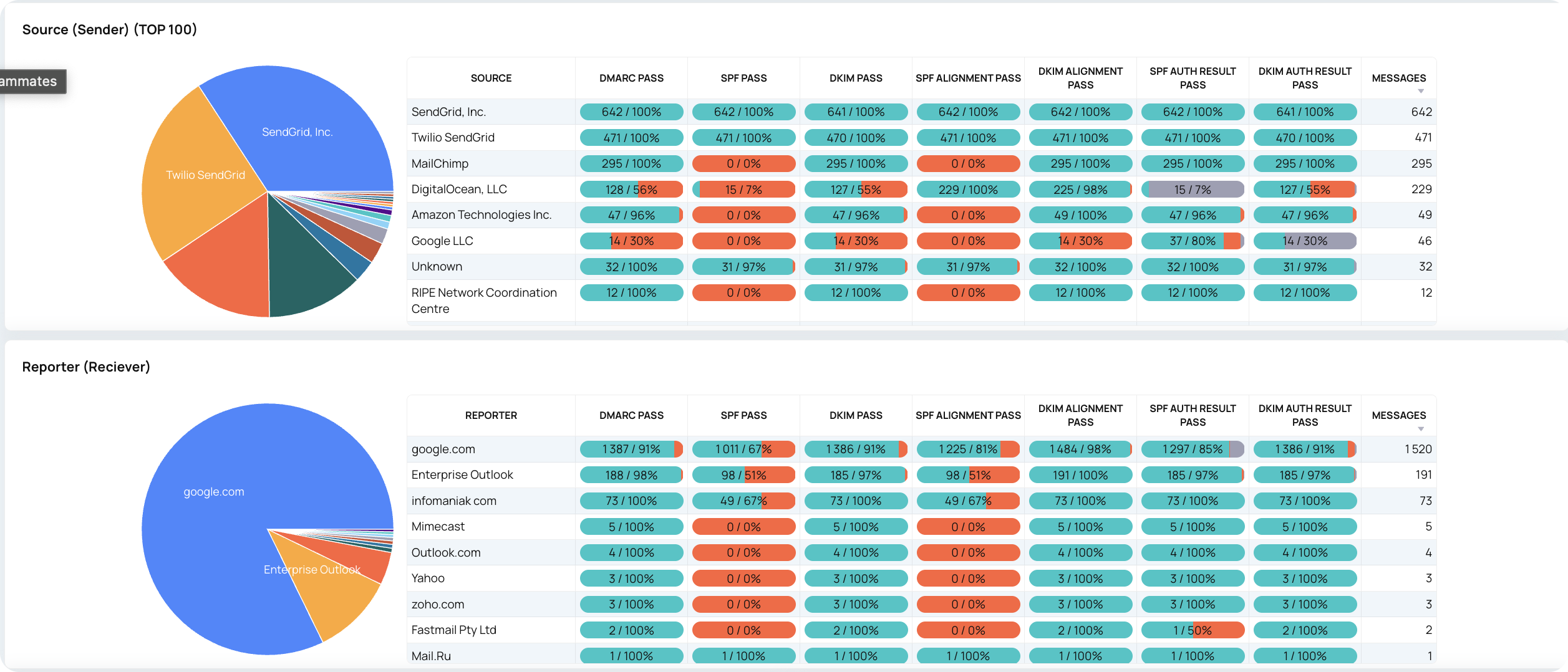
Convert DMARC aggregate reports into readable summaries, charts, and provider-level insights. Review authentication results without manually opening each XML file, or use the Free DMARC Report XML Analyzer when you only need to inspect one report.

Detect senders that fail DMARC checks or appear to impersonate your domain. Use alerts and report details to investigate spoofing, phishing, and domain abuse.

Monitor whether your DMARC configuration is ready for stronger enforcement. Track record setup, policy status, reporting requirements, and alignment issues before moving to quarantine
or
reject.
EmailConsul works as a DMARC report tool for teams that need ongoing visibility, not just one-time XML parsing. It collects, organizes, and analyzes aggregate reports so you can understand authentication status, sender activity, policy results, and provider-level trends.
If you only need to inspect one file, use the Free DMARC Report XML Analyzer.
For continuous monitoring, dashboards, alerts, historical data, and policy guidance, connect your domain to EmailConsul DMARC Monitoring.
Free DMARC Report XML AnalyzerDMARC monitoring is most useful when it connects reports with real sender activity. EmailConsul helps you review domains, subdomains, DNS records, SPF records, DKIM results, IP addresses, domain reputation signals, and policy outcomes from one dashboard.
Use this visibility to find configuration problems, confirm approved senders, investigate failed authentication, and understand whether issues are isolated to one provider or affecting your domain more broadly.
Identify approved services, legacy platforms, unknown senders, and provider-level traffic patterns before they create larger security threats or deliverability issues.
Connect DNS records, policy status, and report outcomes so your team can understand whether implementation details are helping or hurting authentication.
Turn recurring report data into an operational overview with alerts, a clear summary, failed-check analysis, and policy recommendations your team can act on for each IP address or sender source.
Protect your domain, monitor aggregate reports, detect spoofing and phishing attempts, and stay ready for compliance requirements without reading raw XML by hand. EmailConsul gives your team dashboards, alerts, and clear DMARC insights for every sending domain.

Learn more about DMARC setup, authentication failures, aggregate reports, XML analysis, and sender reputation with these EmailConsul resources.
Learn why SPF, DKIM, alignment, DNS, and sender configuration issues can cause failed authentication.
See why enforcement does not remove the need for reports, alerts, and sender visibility.
Understand how clearer report analysis helps teams find configuration and authentication problems faster.
Learn how aggregate reports turn email authentication data into practical deliverability and security insights.
Inspect one aggregate report file before moving to continuous monitoring, dashboards, alerts, and history.
A DMARC monitoring tool collects and analyzes DMARC aggregate reports so you can see which services send email from your domain, whether SPF and DKIM pass, whether alignment is correct, and whether unauthorized senders are trying to abuse your domain.
Yes. A DMARC XML analyzer is useful for checking one report file. A DMARC report tool is designed for ongoing visibility, historical reporting, dashboards, alerts, sender analysis, and policy monitoring across domains.
The most common reports to monitor are aggregate reports, also called RUA reports. They summarize sending sources, message counts, SPF and DKIM results, DMARC pass or fail status, and policy decisions from mailbox providers.
DMARC monitoring can help deliverability by identifying authentication failures, misaligned senders, broken DNS records, and suspicious activity. Fixing those issues can improve trust signals for mailbox providers.
DMARC helps domain owners tell mailbox providers what to do when messages fail authentication. Monitoring shows whether attackers or unauthorized services are sending mail that appears to come from your domain.
SPF and DKIM may pass technically but still fail DMARC if the authenticated domain does not align with the visible From domain. Alignment issues are common when using third-party sending services without proper configuration.
Move gradually after you confirm that legitimate senders pass SPF or DKIM alignment and that your DMARC reports no longer show important authorized traffic failing authentication. Monitoring helps reduce the risk of blocking valid email.
Yes. A strong DMARC monitoring setup should cover root domains, subdomains, approved sending services, and DNS records so you can see where authentication or policy issues appear.
Yes. Even after p=reject, new vendors, DNS changes, subdomains, or unauthorized senders can create new issues. Continuous monitoring helps maintain email security and compliance over time.
Yes. You can use EmailConsul's Free DMARC Report XML Analyzer to inspect a single aggregate report file, then use DMARC Monitoring for continuous dashboards, alerts, and historical analysis.