Inbox Placement Test With Email Spam Checker Signals

Test where your emails land across real mailbox providers and see whether your campaigns reach the inbox, promotions, or spam folder. EmailConsul helps you check inbox placement, identify deliverability risks, and understand issues that a basic email spam checker may miss.

Seedlisting as an Email Deliverability Test

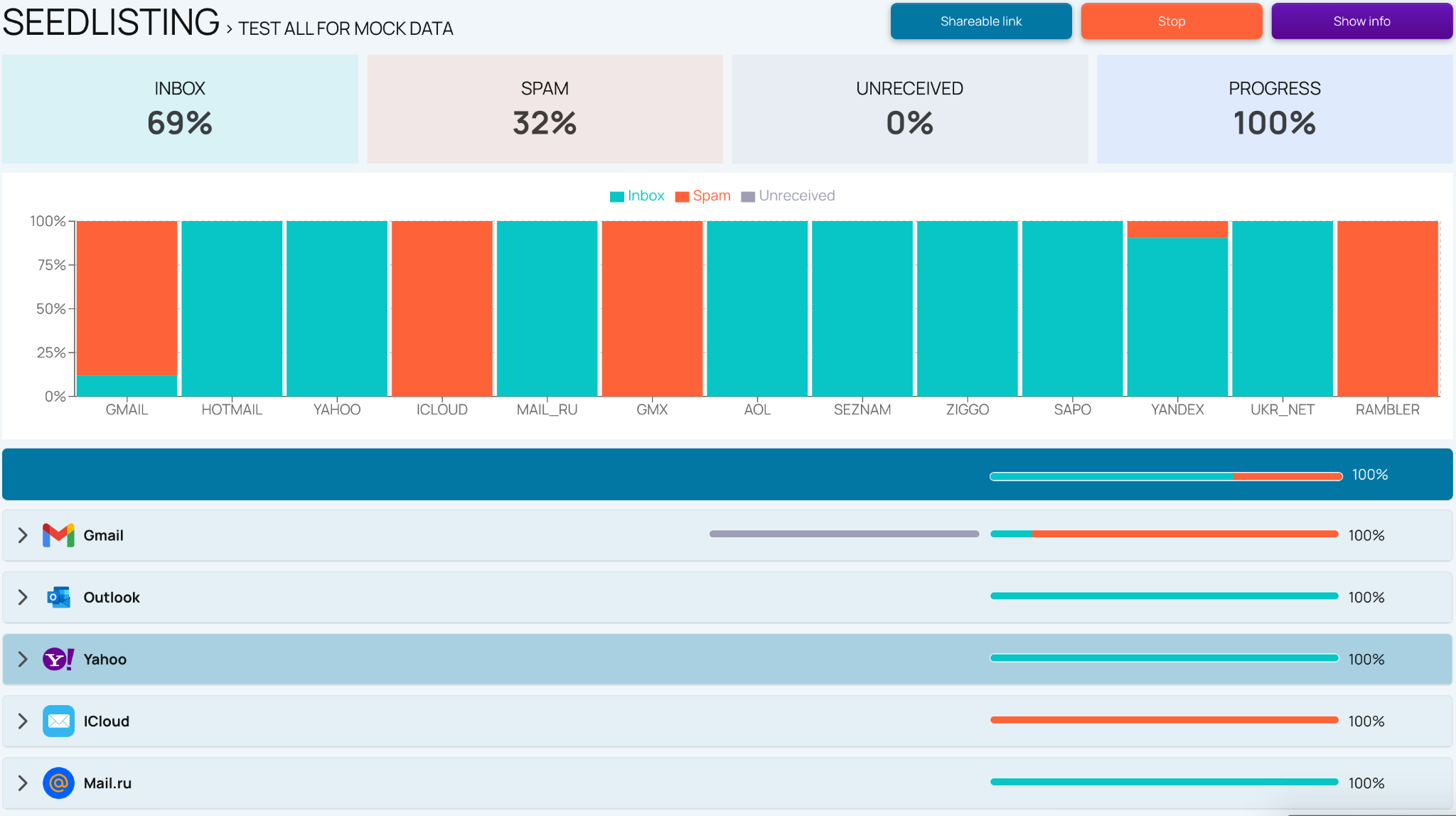
EmailConsul helps marketers, businesses, email deliverability specialists, and bulk senders test campaign placement before messages reach real subscribers. Instead of guessing from open rates, you send your message to a seed list and review real mailbox results. This email deliverability test shows whether your campaign reaches the inbox, promotions, junk, quarantine, spam folders, or is not received. Our article on using seedlistings to understand inbox placement explains how seedlisting reveals provider-level results that a basic email spam checker may miss.

1. Send your email to seed inboxes

Add EmailConsul's seed list to your email marketing tool, ESP, or campaign platform. Send your message as a real email campaign, with the same subject line, content, links, images, attachments, and sending domain.

2. Check where your emails land

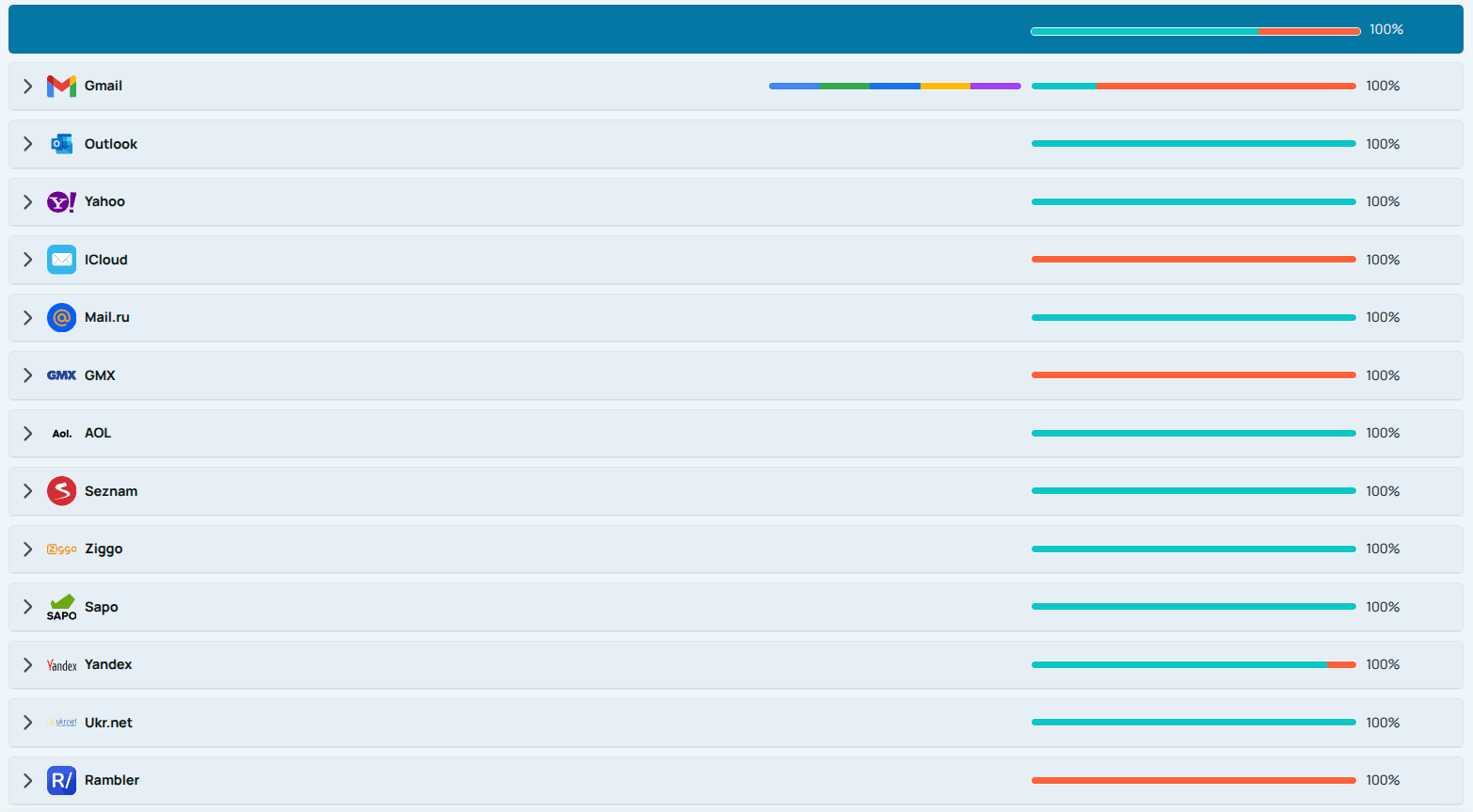
See whether your emails land in the inbox, spam folder, junk folder, promotions, quarantine, or are not received. The report helps you compare placement across Gmail, Yahoo, Microsoft, iCloud, and other inbox providers.

3. Review the deliverability signals

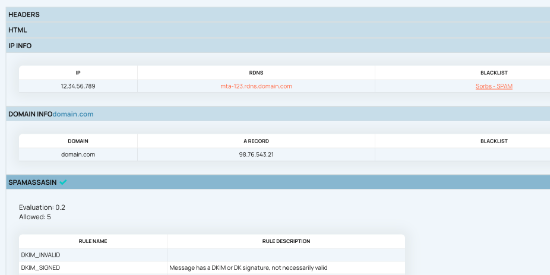
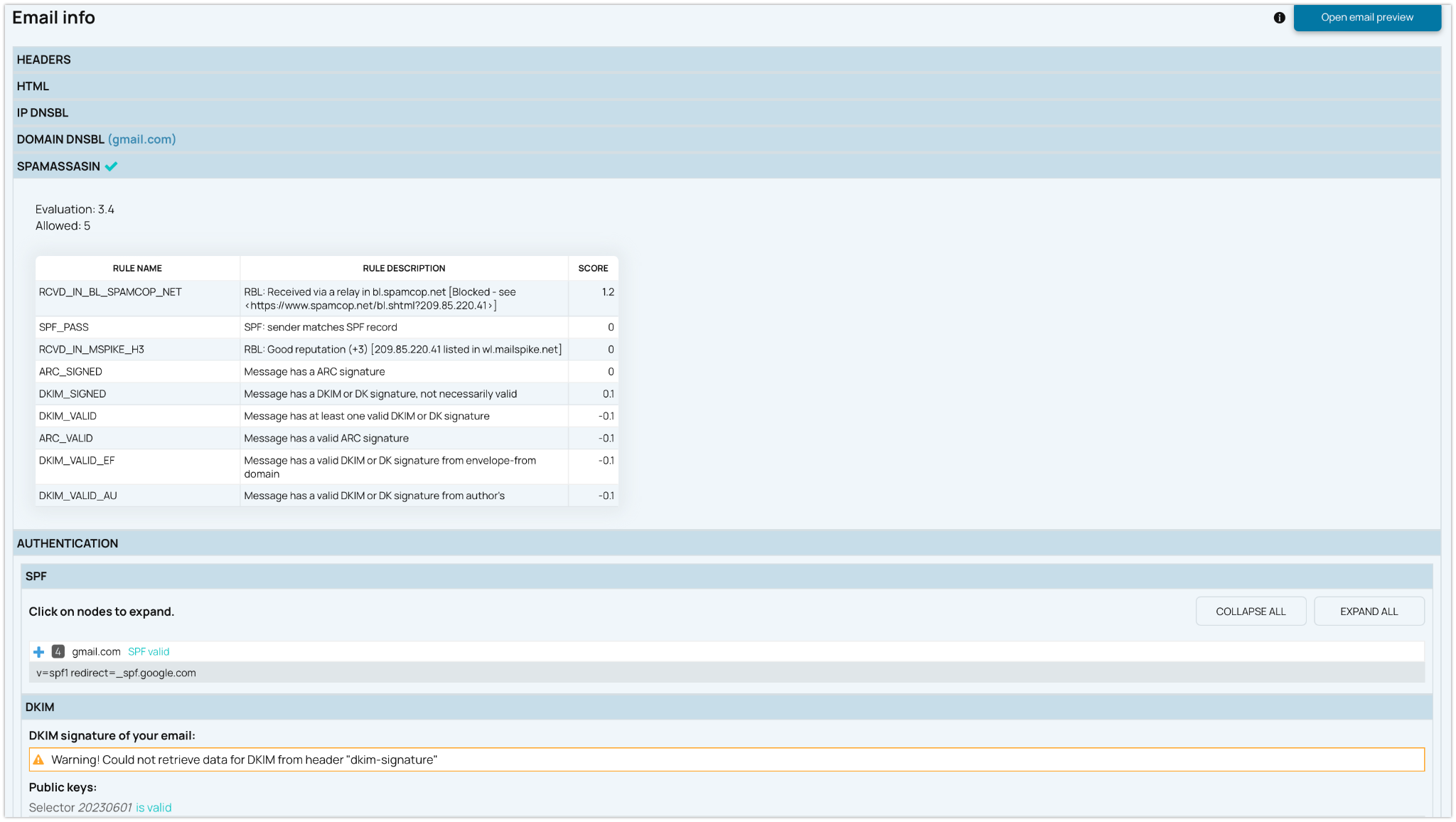
Analyze SpamAssassin score, SPF, DKIM, DMARC, IP and domain blacklist status, authentication checks, sender reputation signals, delivery time, provider placement, and other metrics that affect inbox performance.

Check Campaign Placement Before Your Next Send

Use EmailConsul's seedlisting workflow to send a real campaign to controlled seed inboxes and see how mailbox providers handle it before your audience does. Review inbox, promotions, junk, quarantine, not-received, and spam folders, then connect the result with content analysis, authentication checks, sender reputation signals, SpamAssassin score, and provider-level metrics.

Email deliverability test report with spam folder results, authentication checks, and provider-level metrics

See Where Your Emails Land Before You Send

Your email service provider may show that a campaign was delivered, but "delivered" does not always mean "seen." A message can be accepted by the receiving server and still land in spam, junk, quarantine, or promotions.

Open rates alone are not enough. Some campaigns show healthy engagement while still hiding provider-level inbox placement problems. For more detail, read Good Open Rates Don't Mean Good Deliverability.

EmailConsul seedlisting inbox placement results

Test Gmail, Outlook, Yahoo, and Other Mailbox Providers

EmailConsul combines seedlisting results with technical analysis so you can see where emails land and why. Review inbox, promotions, spam folder, junk, quarantine, and not-received outcomes across major mailbox providers before your audience sees the campaign.

  • Inbox placement results by mailbox provider

    Find Spam Folder Issues Across Providers

    Review placement results by mailbox provider and see whether your messages reach the inbox, spam folder, junk folder, quarantine, or disappear before reaching the recipient. This gives your team a clear view of inboxing risk before important campaigns.

  • SpamAssassin score and deliverability signals

    Review SpamAssassin and Technical Signals

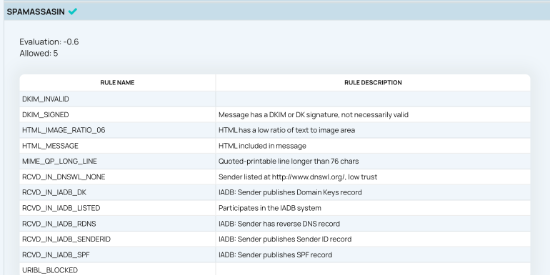
    Review SpamAssassin score and related signals that may point to risky formatting, suspicious headers, missing plain text, weak structure, or other content issues. Use the score as one diagnostic signal, not as the only deliverability factor.

  • Email content, links, and images

    Analyze Content, Links, and Reputation Signals

    EmailConsul does not only look for spam words in your message. It shows how real mailbox providers classify your email, so you can understand whether content, links, authentication, sender reputation, or sending patterns may affect inbox placement.

    Spam filters analyze subject lines, body copy, links, images, attachments, headers, authentication, and sender history together. If you are reviewing campaign copy, our article on spam trigger words explains why some phrases can increase filtering risk when they are overused or presented without context.

    If your campaigns rely heavily on visuals, review our guide on text-to-image ratio in email deliverability. A message with too many images and too little readable text can look suspicious to spam filters even when the design looks polished.

  • SPF, DKIM, DMARC, and DNS verification

    SPF, DKIM, DMARC, and DNS verification

    EmailConsul checks whether your sending domain is properly authenticated with SPF, DKIM, and DMARC. These DNS-based verification signals help mailbox providers decide whether your messages are trustworthy or should be filtered, quarantined, or rejected.

    If you want to understand the technical foundation behind sender authentication, read DNS and Email: Why DNS Is Essential for Email Deliverability.

  • IP and domain blacklist status

    IP and domain blacklist status

    Check whether your sending IP or domain appears on a blacklist/blocklist that can damage inbox placement. Blocklist results can help explain sudden delivery problems, provider-level filtering, and reputation drops.

  • Provider-level reputation results

    Provider-Level Reputation Results

    Mailbox providers evaluate reputation differently. One campaign may land in Gmail inboxes but go to spam or junk at another provider. To understand the difference between infrastructure trust and domain trust, read our guide on domain reputation vs IP reputation.

Improve Campaign Placement Before Performance Drops

Not ready for continuous monitoring yet? Start with the Free Inbox Placement Test. Send one test campaign to EmailConsul's seed list and see whether your message lands in the inbox, spam folder, junk folder, quarantine, or gets blocked.

This free inbox placement test is useful before newsletters, product launches, cold outreach, password resets, seasonal promotions, and high-volume email campaigns. It helps find risk before it affects customers and subscribers.

Start a FREE Inbox Placement Test

Find Deliverability Risks Behind Spam Placement

Spam filtering is not based on one factor. Each mailbox provider uses its own algorithm, filtering rules, reputation data, security checks, engagement signals, and content analysis. A reliable deliverability workflow should review email content, authentication checks, reputation signals, technical metrics, and actual mailbox placement together.

Email content quality

Aggressive subject lines, misleading claims, excessive capitalization, broken formatting, too many promotional words, or low-quality content can increase your spam score. Spam words do not automatically send a message to spam, but they can contribute when combined with other risk signals.

Suspicious links and link reputation

Spam filters review the domains behind your links, redirects, tracking URLs, and landing pages. A risky link can hurt inbox placement even when the rest of the email looks clean.

Images and attachments

Image-heavy emails, missing alt text, large files, and risky attachments can all create deliverability problems. If you send PDFs, documents, or files, read our article on email attachments and deliverability before your next campaign.

Authentication problems

Missing, broken, or misaligned SPF, DKIM, and DMARC records can reduce trust. Authentication issues can make your messages look suspicious, especially when the From domain, sending server, and headers do not align.

Poor Sending Reputation

High complaint rates, low engagement, invalid recipients, spam traps, inconsistent volume, and sudden sending spikes can damage sender reputation. Reputation problems often appear first as provider-specific spam placement before they become a larger delivery issue.

Security and phishing signals

Mailbox providers also look for phishing patterns, spoofing, suspicious attachments, misleading links, and other threats. Strong authentication and consistent domain identity help reduce unwanted filtering.


Turn Spam Folder Signals Into Deliverability Fixes

When an email spam test shows spam placement, EmailConsul helps you understand the deliverability issues behind the result. Check content, links, images, SPF, DKIM, DMARC, blocklists, authentication checks, and reputation signals in one workflow, then use these email deliverability tools to prioritize fixes before your next campaign.

Email spam test insights showing deliverability issues, content analysis, and authentication checks

Track Deliverability Problems Across Email Campaigns

Use inbox placement testing any time poor deliverability would hurt revenue, customer communication, or brand trust.

Before marketing campaigns

Test newsletters, promotions, product announcements, event invitations, and automated campaigns before sending to your full list. This helps protect ROI and reduces the risk of spam placement.

Before transactional or lifecycle messages

Password resets, onboarding emails, billing notices, and account notifications need strong inbox placement. Testing helps confirm that important messages can reach recipients when they need them.

After changing your ESP, domain, IP, or template

Run a new inbox placement test after changing email service providers, sending domains, IP addresses, DNS records, templates, tracking links, or automation workflows. Even small changes can affect how filters evaluate your messages.

Seedlisting FAQ

What does a seedlisting test show?

An inbox placement test sends your campaign to real seed inboxes and shows whether it reaches the inbox, promotions, spam folder, junk folder, quarantine, or is not received. EmailConsul also checks supporting deliverability signals such as SpamAssassin score, SPF, DKIM, DMARC, blocklists, sender reputation, and provider-specific results.

Is seedlisting the same as an inbox placement test?

Yes. Seedlisting is the method behind an inbox placement test: you send a real message to controlled seed addresses at different mailbox providers, then review where the message actually lands. A basic email spam checker may review content, spam words, links, or headers, but seedlisting shows provider-level placement.

Can a delivered email still land in spam?

"Delivered" usually means the receiving server accepted the message. It does not guarantee inbox placement. A delivered email can still land in spam, junk, promotions, quarantine, or another filtered folder.

What does EmailConsul check in an email deliverability test?

EmailConsul checks where your email lands across seed inboxes, including inbox, promotions, junk, quarantine, not received, and spam folders. It also reviews SpamAssassin score, SPF, DKIM, DMARC, IP and domain blocklists, sender reputation signals, authentication checks, content analysis, and provider-level metrics.

Should I test campaigns before every major send?

You should test important campaigns before sending, especially when changing email content, sender domain, IP address, ESP, subject line, links, images, attachments, or sending volume. Regular testing helps detect issues before they affect real recipients.

Can wording alone cause emails to land in spam?

Spam words can contribute to filtering, but they are only one factor. Spam filters also evaluate sender reputation, authentication, engagement, links, headers, domain history, complaint rates, and email content quality.

Should I whitelist seed addresses before testing?

Do not change mailbox-provider behavior just to make a test look better. If your ESP requires you to allow or whitelist imported test contacts, that is fine, but the goal is to send the message normally so the inbox placement test reflects real campaign conditions.

Why do Gmail, Yahoo, and Outlook show different spam results?

Each mailbox provider uses its own filtering algorithm, reputation data, security checks, and engagement signals. That is why one campaign can land in Gmail inboxes but go to spam, junk, or quarantine at another provider.

Does EmailConsul detect phishing or security risks?

EmailConsul is focused on deliverability and inbox placement, but several deliverability signals overlap with security. Authentication failures, suspicious links, spoofing patterns, risky attachments, and domain reputation issues can all affect whether mailbox providers treat a message as trustworthy.

Check Where Your Emails Land Before You Send

Do not wait until open rates drop or customers report missing emails. Use EmailConsul's seedlisting and inbox placement testing to see how mailbox providers handle messages before they reach your real audience.