How to Make an AI Assistant: Inside EmailConsul’s AI Chat Architecture
Key Takeaways
- Build a product-aware AI assistant around controlled tools that return only the data needed to answer each question.
- Choose an agent framework and LLM based on your data-access, quality, context, latency, and cost requirements—not model capability alone.
- Keep prompts focused by passing recent conversation context, a compact summary, and only the tools relevant to the request.
- Enforce permissions and data boundaries in the backend so the assistant cannot expose data a user cannot access elsewhere in the product.
- Treat the assistant as an evolving system: test it with real questions, improve its tools and prompts, and keep its architecture adaptable.
What You Need to Make an AI Assistant
Adding an AI chat to a product sounds simple at first. You choose a model, connect an API, write a system prompt, and suddenly users can ask questions instead of clicking through dashboards. In reality, that is only the easiest part.
The real challenge starts when the chat is not just a generic assistant, but a product-aware AI layer that has to understand real user data, work across many independent features, enforce permissions, choose the right data source, avoid hallucinations, and still stay fast and affordable.
That was exactly the challenge we faced while building AI Chat for EmailConsul.
EmailConsul has many different features and stores a large amount of user data. While this information is valuable, finding the right insights often requires navigating through multiple sections of the platform and analyzing various metrics.
Our goal was to make this process easier by allowing users to ask questions in natural language and receive clear, actionable answers based on their EmailConsul data.
But we quickly learned that building this kind of AI assistant is not just about prompt engineering. Sending all available data to the model was not realistic. It would be slow, expensive, difficult to debug, and risky from an accuracy point of view. We needed an architecture where the model could reason about the user’s question, choose the right tools, request only the necessary data, and generate a useful answer without having direct access to everything.
Choosing an AI Agent Framework
Before choosing a model, you need to decide how the model will interact with your product data.
In a real product, an AI chat cannot work as a standalone chatbot. It needs to understand the user’s question, decide what data is needed, call the right tool, and generate an answer based on the returned result. This is where agent frameworks become useful.
The two most common options to consider are LangChain and LlamaIndex. Both can be used to build RAG-based applications and agents that work with external data, tools, and workflows. The main difference is not that one is “better” than the other, but that they have a different focus.
| Criteria | LangChain | LlamaIndex |
|---|---|---|
| Main focus | Complex LLM workflows, chains, agents, and integrations | Connecting LLMs with external data and making it easier to retrieve and query that data |
| Best for | Applications with many custom workflow steps and integrations | Applications where the main challenge is data access and retrieval |
| Agent support | Strong support for agents and tool usage | Supports agents and tools with a more data-oriented approach |
| Complexity | Very flexible, but can add more abstractions | Easier to start with when the main goal is working with data |
| When to choose | When you need complex orchestration between many services | When you need the model to work with product data through controlled tools |
For our case, the main challenge was not building a complex automation workflow. The main challenge was giving the AI chat controlled access to EmailConsul data. The assistant had to work with different product features, select the correct backend tool, fetch only the necessary data, and answer based on that data.
Because of that, we chose LlamaIndex as the foundation for our agent layer.
The most important lesson here is that the framework should match your problem. If your AI chat mostly needs to orchestrate many complex workflow steps, LangChain may be a better fit. If your main problem is retrieving, querying, and analyzing product data, LlamaIndex can be a simpler and more focused choice.
Choosing the Right LLM for an AI Assistant
Choosing the right LLM is one of the most important steps when building an AI chat. The model affects almost everything: the quality of answers, how well the agent follows instructions, how much context it can process, response speed, and, of course, the final cost of the feature.
There are many models and providers to choose from: OpenAI GPT models, Claude, DeepSeek, Kimi, and others. In most cases, the goal is not to find the most powerful model possible, but to find the model that gives the best balance between quality and price for your specific use case.
During the development of AI Chat in EmailConsul, we started with GPT-4o mini because it was fast, cost-efficient, and good enough for the first version of the feature. It allowed us to build the initial architecture, test tool calling, improve prompts, and understand how users might interact with the chat.
Later, we moved to GPT-4.1. The main reasons were the larger context window, better instruction following, and still acceptable cost for our use case. Since we had already spent time improving our prompts for a weaker model, those prompts worked even better after switching to GPT-4.1.
Finally, we decided to use different models for different tools, rather than focus on a single provider. Every tool has its own requirements and limitations, so the selected model should meet them. We also need to ensure that each model can be easily switched to another one without sacrificing the outcome.
When choosing a model for an AI chat, we recommend looking at several key factors:
| Criteria | Why it matters |
|---|---|
| Cost | Expensive models can quickly burn the budget, especially if many users interact with the chat every day. |
| Answer quality | The model still needs to provide useful, accurate, and well-structured answers. Low cost does not help if users cannot trust the output. |
| Context window | The agent needs enough context to understand the current question, previous messages, tool results, and product-specific instructions. |
| Max output tokens | A large output limit is useful, but in a chat interface it usually does not make sense to return too much information at once. Long answers can become less focused and less useful. |
| Rate limits / TPM | If many users send requests at the same time, token-per-minute limits can become a real production bottleneck. |
Model specifications and pricing below were checked on July 23, 2026. These values change, so review the official GPT-4o mini documentation, GPT-4.1 documentation, and OpenAI API pricing page before making a production decision.
The following was a simplified comparison of the two OpenAI models during our evaluation:
| Model | Context window | Max output tokens | Input price | Output price | Fit for our use case |
|---|---|---|---|---|---|
| GPT-4o mini | 128K tokens | 16K tokens | $0.15 / 1M tokens | $0.60 / 1M tokens | Good for early development and cost-efficient testing |
| GPT-4.1 | Up to 1M tokens | 32K tokens | $2.00 / 1M tokens | $8.00 / 1M tokens | Better for production usage where context size and answer quality matter more |
GPT-4.1 became the better choice because our AI chat has to work with multiple product features, user-specific data, previous chat messages, tool results, and strict instructions. The larger context window gives the agent more room to operate without losing important details during the conversation.
At the same time, models continue to evolve. We may switch to a more powerful or more efficient option in the future if it better fits our needs.
Simply choosing a model with a large context window and sending all available data to it is not a good solution. The model is only one part of the system. Good prompts, controlled tools, optimized data retrieval, and careful filtering are just as important for keeping the feature accurate and cost-efficient.
Prompt Engineering, Memory, and Tool Selection
After choosing the model, the next important step is prompt engineering. For an AI chat in a real product, the system prompt is not just a short instruction like “answer as a helpful assistant.” It has to describe the assistant’s role, how it should work with product data, when it should use tools, what it should avoid, and how it should behave when data is missing or the question is unclear.
At the same time, the system prompt should not become too large. It is sent with every request, so every unnecessary sentence increases token usage and cost. The goal is to make the prompt complete enough to guide the agent, but still optimized and focused.
Another important part is conversation history. The agent should receive the last N messages from the current chat; otherwise, it may lose context between follow-up questions. For example, if the user first asks about DMARC issues and then asks “What should I fix first?”, the assistant needs previous messages to understand what “this” refers to.
Sending the entire conversation history is usually unnecessary and can quickly increase token usage. A better approach is to pass only the most recent messages that are enough to keep the context, while keeping the request compact and cost-efficient.
Passing only the last N messages helps the agent understand recent follow-up questions, but it is not always enough for longer chats. To solve this, we store a short chat summary that is generated and updated by a separate tool during the conversation. This summary contains the main context of the chat: what the user asked about, which topics were discussed, what assumptions were made, and what important results were already found.
This gives the main agent a compact version of the conversation history without overloading the prompt with every previous message. As a result, the assistant can better continue long conversations, understand references to earlier topics, and still keep token usage under control.
The next important part is tool descriptions. If you use an agent-based architecture, the model needs to understand which tool should be used for which type of question. Tool descriptions should be clear and specific enough for the agent to make the right decision. If the descriptions are too vague, the model may choose the wrong tool or call a tool when it is not needed.
However, giving the agent all available tools at once can also become a problem. When the product has many features, too many tools can make the context noisy and make tool selection less accurate.
In EmailConsul, we solved this by adding an extra step before the main agent call. First, a smaller and cheaper model analyzes the user’s question and determines which tools are relevant. Then only those tools are passed to the main agent. This keeps the context cleaner, reduces token usage, and makes it easier for the main model to choose the correct tool.
This becomes especially important when users ask questions that combine multiple EmailConsul features in one request. For example:
“Get all domains that failed DMARC during the last week, compare those domains against Google Postmaster data, verify whether they are listed on any DNSBLs, and show what stats those domains have in inbox placement tests for the last week. Do the same for the previous week, compare the two weeks, and determine whether there are any anomalies.”
This is not a simple question for one data source. To answer it correctly, the agent needs to understand the time range, identify domains with DMARC issues, call Google Postmaster tools, check DNSBL data, retrieve inbox placement results, repeat the same process for the previous week, compare both periods, and then summarize what actually changed.
Other realistic questions could be:
“Which domains had the biggest drop in deliverability this month, and was it related to DMARC, Google Postmaster reputation, DNSBL listings, or inbox placement?”
“Show me the domains that started failing DMARC recently, check whether they also have Postmaster issues, and suggest what should be fixed first.”
“Compare inbox placement for my top sending domains between this week and last week. Highlight only domains with meaningful changes and explain possible reasons.”
“Are there any IPs that appeared on DNSBLs and also have worse seedlisting results during the same period?”
These examples show why tool descriptions, tool selection, chat history, and summary are so important. The agent should not guess or receive all available data by default. It should understand the task, select the right tools, work only with data the user is allowed to access, and return a focused answer instead of a huge raw table.
Prompts also need to describe system limitations. For example, in EmailConsul, some sub-users have access only to specific profiles and can view only a limited part of the data. The agent must respect these restrictions and should never return information that the user is not allowed to access.
There are also practical limitations around how much data should be shown in the chat. Even if the system can return a table with 100 rows, it does not always mean that it should. In many cases, a short summary, key findings, and the most important rows are more useful than a huge raw dataset.
The main lesson is that prompt engineering is not only about making the model sound better. It is about defining rules, boundaries, tool behavior, data access logic, and response format. A good prompt helps the agent stay useful, predictable, and cost-efficient.
AI Assistant Architecture: Step-by-Step Flow
After choosing the model, framework, and prompt strategy, we ended up with a tool-based architecture where the main agent does not receive all data or all tools by default.
The main idea is simple: before calling the main agent, we prepare only the context and tools that are relevant to the current user request. This helps keep the prompt smaller, improves tool selection, reduces cost, and makes the system easier to manage.
The final flow looks like this:
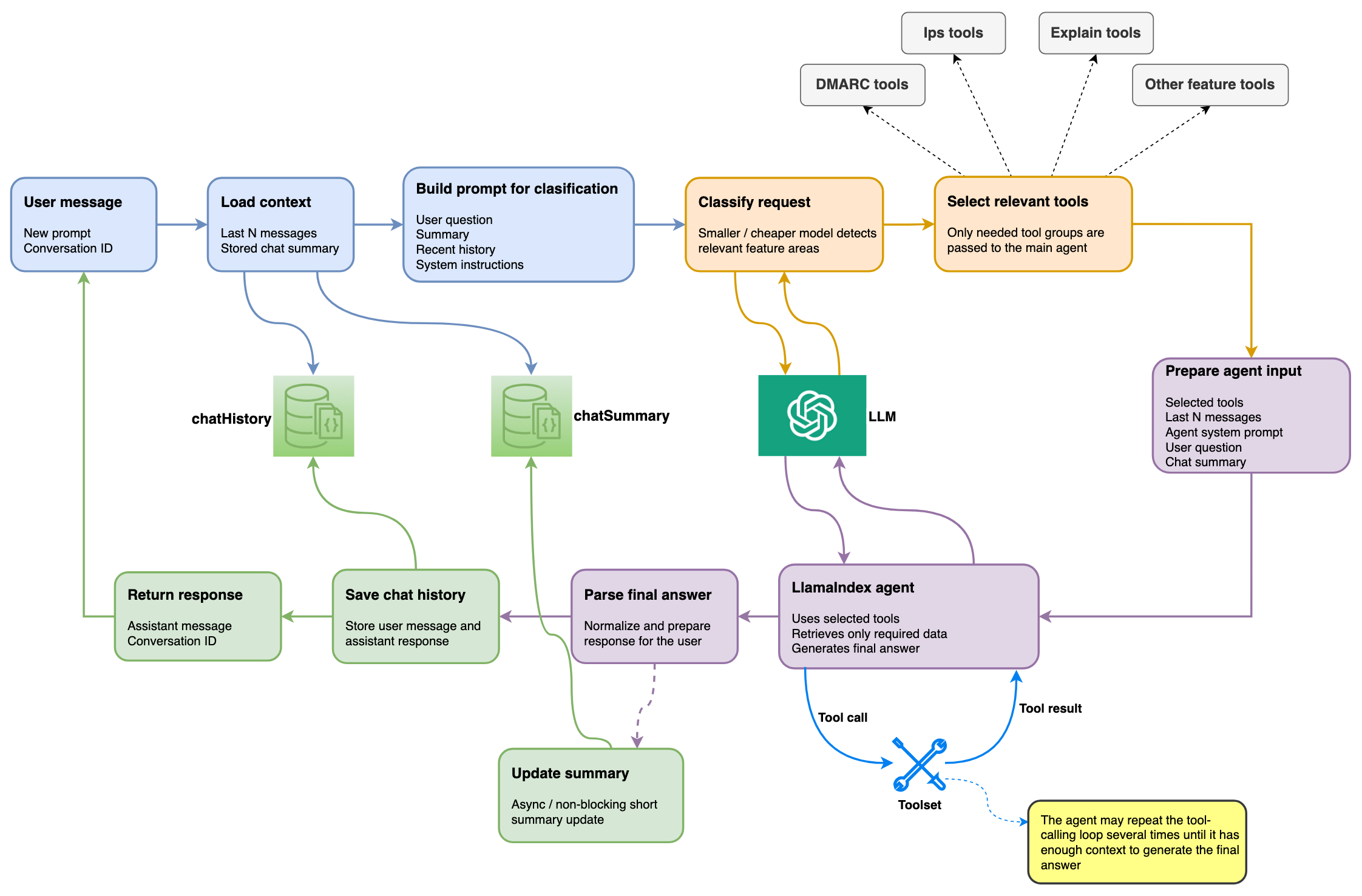
Step 1: User sends a message
The flow starts when the user sends a new message to the AI chat. Together with the message, we also receive the conversation_id, which allows us to continue an existing conversation instead of treating every request as a new chat.
Step 2: Load conversation context
Before calling any model, we load the required context from the database:
- The last N messages from the chat history
- The stored chat summary
The last messages help the agent understand recent follow-up questions, while the summary gives it a compact version of the broader conversation context.
Step 3: Build the prompt for classification
Next, we build a compact prompt for the classification step. This prompt includes the user’s current question, recent history, the chat summary, and system instructions.
At this stage, we are not trying to answer the user yet. The goal is only to understand which EmailConsul features are relevant to the request.
Step 4: Classify the request
A smaller and cheaper model analyzes the user’s question and determines which feature areas are needed. For example, the request may be related to DMARC, IP tools, explanation tools, seedlisting, Google Postmaster data, or multiple features at once.
This step allows us to avoid passing every available tool to the main agent.
Step 5: Select relevant tools
Based on the classification result, we select only the tools that are needed for the current request. This is an important optimization because tool descriptions are also part of the model context. If we pass too many tools, the prompt becomes larger and the model may have a harder time choosing the correct one.
Step 6: Prepare the main agent input
After selecting the tools, we prepare the input for the main LlamaIndex agent. The agent receives:
- Selected tools
- The last N chat messages
- The agent system prompt
- The user question
- The chat summary
This gives the agent enough context to answer the question, but without sending the full conversation history, all available tools, or unnecessary data.
Step 7: Run the LlamaIndex agent
The LlamaIndex agent receives the prepared input and starts processing the request. It can call selected tools, retrieve required data, analyze tool results, and decide whether it needs additional information.
In some cases, the agent can complete the answer after one tool call. In more complex cases, it may repeat the tool-calling loop several times until it has enough context to generate the final answer.
Step 8: Parse the final answer
Once the agent returns the final response, we parse and normalize it before sending it back to the client. This step helps keep the response format consistent and prepares the result for saving into the chat history.
Step 9: Save chat history
After the final answer is generated, we save both the user message and the assistant response to the chat history. This allows the next request in the same conversation to use recent messages as context.
Step 10: Update the chat summary asynchronously
In parallel, we update the stored chat summary. This process is asynchronous and does not block the response to the user. The summary works as a compact memory of the conversation. It helps the agent continue longer chats without sending the entire message history on every request.
Step 11: Return the response to the client
Finally, the client receives the assistant response and the same conversation_id, so the conversation can continue naturally.
This architecture helped us keep the AI chat more predictable and cost-efficient. The main agent gets enough context to answer complex questions, but the system still controls what data, tools, and history are passed into each request.
AI Assistant Permissions, Security, and Data Boundaries
One of the most important problems you can face when building an AI chat for a real product is making sure the assistant follows the same access restrictions as the rest of the system.
An AI chat should never become a way to bypass permissions. If a user cannot see some data in the platform UI, they should not be able to get that data by asking the assistant in natural language.
The key lesson here is simple: security should not rely only on prompts. Of course, the system prompt can explain that the assistant must respect user permissions and should not return data the user is not allowed to access. But this is not enough. Prompts help guide the model’s behavior, but real access control must be enforced in the backend.
In EmailConsul, this is especially important for sub-users. Some sub-users have access only to specific profiles, which means they should see only the data related to those profiles.
To handle this safely, we do not simply ask the model to “remember” this restriction. Instead, we pass the required restriction parameters into the request context and automatically apply them inside the tools.
For example, if a sub-user is limited to a specific profile, the profile restriction is passed to the tool layer and used when fetching data. The agent can still decide which tool to call, but it cannot remove or ignore the access filter. The tool itself returns only the data that matches the allowed scope.
This creates a clear boundary:
- The model can reason about the user’s question
- The model can choose relevant tools
- The backend controls what data those tools are allowed to return
This approach is much safer than giving the model broad access and expecting the prompt to prevent mistakes.
The same rule applies to missing or restricted data. If there is no data available, or if the user does not have permission to access it, the assistant should say that clearly instead of guessing or generating a confident answer based on incomplete information.
In practice, this means that every tool should be designed with access control in mind. AI should work inside the same security boundaries as the rest of the product. Prompts can describe those boundaries, but backend tools must enforce them.
Best Practices for Building a Production AI Assistant
1. Do not start with the LLM
Choosing the model is important, but it should not be the first architectural decision. Before that, you need to understand how the model will access your product data, what tools it will use, how permissions will work, and how much context you can afford to send with every request.
A good AI chat is not just a model. It is the whole system around it.
2. Do not send all data to the model
Even if the model has a large context window, sending all available user data is usually a bad idea. It increases cost, makes responses slower, adds noise to the context, and makes debugging harder.
A better approach is to let the agent request only the data it needs through controlled tools.
3. Keep tools focused and predictable
Each tool should have a clear responsibility. If a tool does too much, it becomes harder for the model to understand when to use it and harder for developers to debug the result.
Good tools should return structured, relevant, and already filtered data instead of large raw datasets.
4. Do not pass all tools by default to LLM
When a product has many features, passing every tool to the agent can make the context noisy and reduce tool-selection accuracy.
A separate classification step can help here. A smaller and cheaper model can first determine which feature areas are relevant, and then only those tools are passed to the main agent.
5. Optimize prompts, but do not overload them
The system prompt should clearly explain the assistant’s role, rules, limitations, and response style. But it should not become a huge document that is blindly sent with every request.
Every prompt token has a cost, so the prompt should be complete enough to guide the agent, but still focused and optimized.
6. Use both recent history and a chat summary
Passing the last N messages helps the assistant understand follow-up questions. But for longer conversations, recent messages are not always enough.
A stored chat summary gives the agent a compact memory of the conversation without sending the entire history every time. This helps preserve context while keeping token usage under control.
7. Enforce permissions in code, not only in prompts
Security should not depend only on the model following instructions. If a user has limited access, those restrictions must be applied in the backend and inside the tools.
The model can decide which tool to call, but the tool should return only the data the user is allowed to see.
8. Limit the amount of data shown in chat
Even if the system can return a table with hundreds of rows, it does not mean the chat should display all of it. In many cases, users need a summary, key changes, anomalies, and the most important rows.
The goal is not to show as much data as possible. The goal is to help the user understand what matters.
9. Test on real product questions
The best way to evaluate an AI chat is to test it on realistic user questions that combine multiple product features, filters, time ranges, and edge cases. This helps reveal problems with tool selection, permissions, missing data, hallucinations, and response quality.
10. Treat AI chat as an evolving system
The first implementation will not be perfect. Models will change, prices will change, user behavior will reveal new cases, and some tools will need to be improved.
The architecture should make it easy to replace the model, add new tools, improve prompts, and optimize costs without rewriting the whole system.
The main lesson is that building an AI chat for a real product is mostly an architecture problem. The model is important, but the real quality comes from controlled data access, clear tools, strong prompts, permission boundaries, cost optimization, and continuous testing.