FCrDNS: The DNS Check That Can Make or Break Your Email Deliverability
When people talk about email deliverability, you usually hear the big three: SPF, DKIM, DMARC.
But there's another behind-the-scenes check that can affect how mailbox providers handle your email: FCrDNS.
Sounds technical? Don't worry. This FCrDNS check is straightforward once you see the two DNS lookups involved.
For a broader look at email DNS records, see DNS and Email: Why DNS Is Essential for Email Deliverability.
Key Takeaways
- FCrDNS checks whether a sending IP and hostname map back to each other.
- A pass confirms DNS consistency, not message authenticity.
- Check each active outbound IP after infrastructure changes.
What Is FCrDNS?
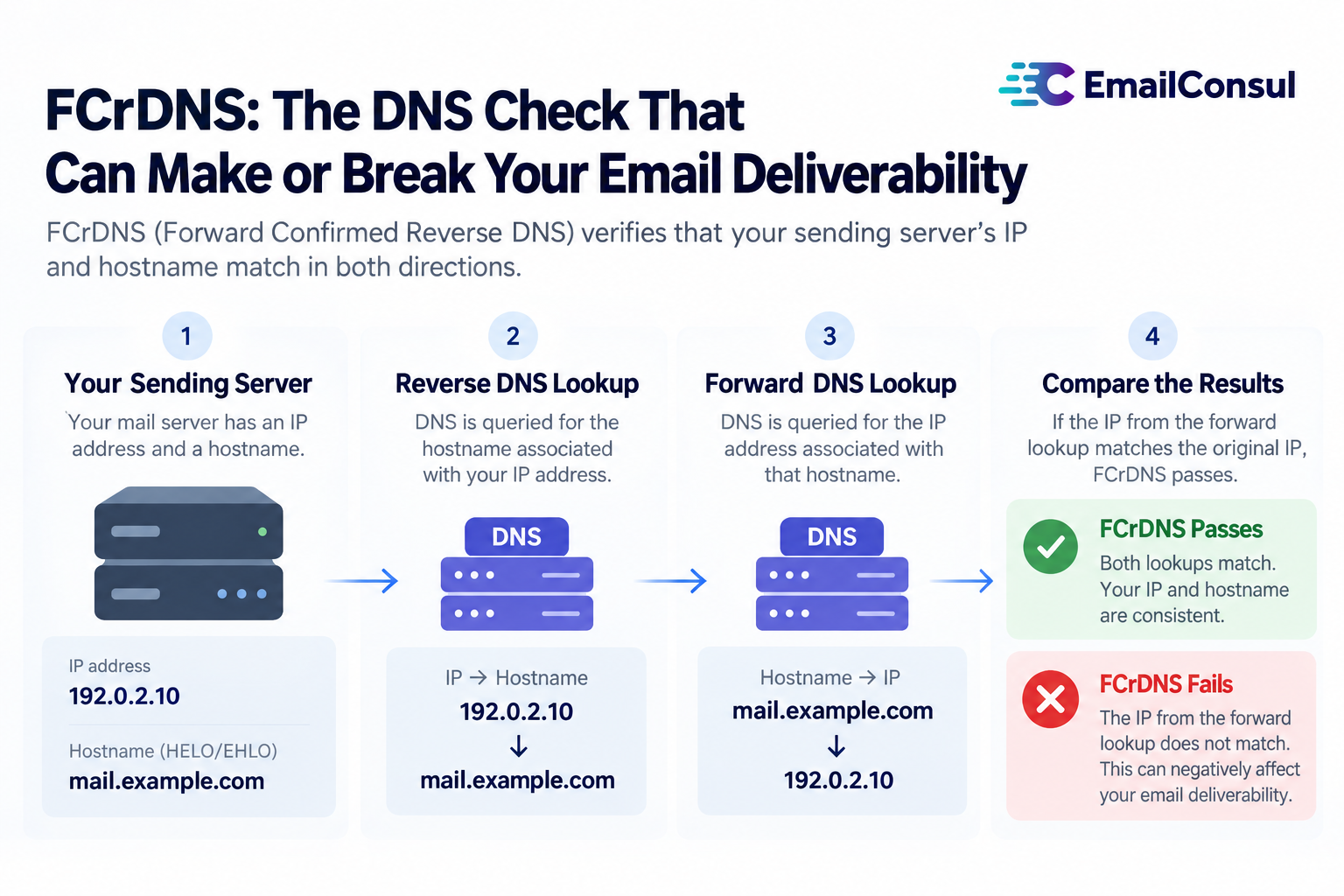
FCrDNS stands for Forward-Confirmed Reverse DNS.
It's a mouthful, but the idea is simple:
- Every email comes from an IP address.
- That IP should have a Reverse DNS (rDNS) record, which points to a hostname (like mail.example.com).
- That hostname should also resolve forward back to the same IP.
If both lookups point back to the same IP address, the DNS mapping is consistent. That does not, by itself, authenticate the message or prove the sender is trustworthy. RFC 8501 explains the limits of drawing trust conclusions from matching records.
👉 Think of it like caller ID:
- Reverse DNS = the phone number shows a name.
- Forward DNS = calling that name's number gets you back to the same phone.
- If they don't match, the DNS mapping cannot be confirmed.
Why FCrDNS Matters for Email
Gmail and Yahoo require valid forward and reverse DNS for senders. Outlook.com requires valid reverse DNS.
Here's why this check matters:
- DNS consistency - The PTR hostname should resolve back to the public sending IP.
- Hostname details - The mapping identifies the hostname associated with a sending IP.
- Delivery impact - Missing or mismatched records can lead to delays or rejection.
Without a valid FCrDNS, your emails may:
- End up in spam
- Get throttled or delayed
- In some cases, get rejected outright
For example, Google documents temporary rate limiting under 451 4.7.23 and blocking under 550 5.7.25 when a sending IP has no PTR record or its forward DNS does not point back to that IP.
How to Check FCrDNS
The good news: it's easy to test. Start with the public IP address that connected to the receiving provider, not just any IP in the message headers.
- Find your sending IP.
- Use the Received entry added at the receiving provider's inbound boundary.
- Or ask your ESP or hosting provider for the outbound sending IP.
- Run a reverse DNS lookup.
- Try
dig -x 192.0.2.10. Does the IP return a hostname such asmail.example.com?
- Try
- Run a forward DNS lookup for that hostname.
- Try
dig mail.example.com A. Do the returned addresses include the original sending IP?
- Try
You can also enter your sending IP in EmailConsul's free IP blocklist check to check its FCrDNS mapping.
If yes → ✅ This IP passes the FCrDNS check.
If not → ❌ Time to fix the DNS mapping.
In this EmailConsul example, entries highlighted in red in the RDNS column indicate mismatched DNS mappings. The remaining entries show matched mappings. (The screenshot uses fictional data for demonstration purposes only and does not show real lookup results.)
These commands use the illustrative IP and hostname below. If you send over IPv6, use dig -x with the IPv6 address and check the returned hostname's AAAA records too. The original IP must appear among the returned addresses for that sending route to pass this FCrDNS check. See the ISC dig manual and the reverse and forward lookup procedure in RFC 7208.
Example of Proper Setup
IP: 192.0.2.10
Reverse DNS (PTR): mail.example.com
Forward DNS (A record): mail.example.com → 192.0.2.10
This is clean alignment between the sending IP and the hostname.
Common Mistakes
- Missing rDNS entirely
Check whether your IP provider has published a PTR record for the sending IP. - Mismatch
IP resolves to server123.hosting.com, but the hostname's forward lookup does not include that IP. - Assuming every hostname must be branded
A provider-owned hostname can still have a valid FCrDNS mapping. A branded hostname is an option when your provider supports it. Microsoft documents provider-owned hostnames that pass the check.
How to Fix It
If you manage your own server:
- Ask your hosting or IP provider to set the PTR record for your sending IP.
- Make sure the PTR hostname's A record (or AAAA record for IPv6) includes that same IP.
If you're using an ESP:
- Ask which outbound IP sends your mail and whether the ESP manages its reverse DNS.
- Verify that the IP's PTR hostname resolves back to that IP.
A branded hostname such as mail.yourdomain.com can be an option if your provider supports it. A provider-owned hostname can also pass FCrDNS.
EmailConsul's free IP blocklist check and free domain blocklist check include FCrDNS among their DNS checks. For ongoing review, see IP & Domain Blocklist Reputation.
Need help with your email deliverability? Explore EmailConsul's deliverability consulting.
Pro Tips
✨ Keep each check configured for its own purpose:
- FCrDNS checks the IP-to-hostname mapping.
- HELO/EHLO identifies the sending server.
- DMARC checks whether the visible From domain aligns with an authenticated SPF or DKIM identity.
They do not all need the same hostname.
✨ Monitor regularly.
DNS misconfigurations happen - a hosting change or IP swap can break FCrDNS without you noticing. Repeat the check for every active outbound IP address, including IPv6 where used, and after an IP or provider change. EmailConsul's IP & Domain Blocklist Monitoring can automate this monitoring with dashboards and alerts.
✨ Test deliverability.
Use EmailConsul's free IP check to review FCrDNS and other IP signals, its Google Postmaster monitoring for mail sent to personal Gmail accounts, and its inbox placement testing to see where a campaign lands in seed inboxes.
Automate Monitoring of Your Sending IP and Domain
Check FCrDNS through EmailConsul's IP & Domain Blocklist Monitoring, with dashboards and automatic alerts.
Final Thoughts
FCrDNS isn't as famous as SPF or DKIM, but it's a useful infrastructure check. A consistent IP-to-hostname mapping gives receiving servers one technical signal; it does not prove who sent the message.
So before your next campaign, ask yourself:
- Does my sending IP return a PTR hostname?
- Does that hostname resolve back to my sending IP?
If yes - the DNS mapping passes this check.
If not - work with your IP or ESP provider to fix the records before you send.